

IPTV buffering UK-wide almost always comes down to one of four things: your home network, the device you’re watching on, the player app, or the provider’s servers at peak time. This guide is for anyone in the UK watching IPTV on a Firestick, Android box, Smart TV, Apple device, phone or computer who wants the picture stable again — not a general explainer of what IPTV is, but a working list of fixes ordered by how often they actually solve the problem. Work through the general fixes first, then jump to the section for your specific device and app.
Quick answer: the fixes that work most often
Most UK buffering complaints come down to one of these five things, roughly in order of likelihood:
- This is a fast IPTV buffering UK fix: The device is on the 2.4GHz Wi-Fi band instead of 5GHz, or too far from the router.
- For IPTV buffering UK, try this: The player app’s cache is full, or too many background apps are competing for memory.
- A reliable IPTV buffering UK fix: The video decoder in the app is set wrong for the device.
- One of the quickest ways to stop IPTV buffering UK: Too many devices are streaming on the same subscription at once.
- This step alone often resolves IPTV buffering UK: It’s genuinely peak time (a big match kick-off) and the provider’s servers are under load.
Try them in that order before assuming anything is broken. The rest of this guide explains why each one causes buffering and exactly where to change it.
What causes IPTV buffering UK-wide?
IPTV buffering happens when your device can’t get the next few seconds of a stream fast enough to keep playing smoothly, so it pauses to catch up. A handful of things get in the way. (If the streaming chain itself is new to you, our explainer on how a UK IPTV service delivers streams to your TV walks through each step.)

Home broadband and Wi-Fi
This is one of the most common causes of IPTV buffering UK-wide. Your broadband plan’s headline speed is not the speed reaching your TV. Wi-Fi signal drops off with distance, walls and interference from neighbouring routers, so a fast connection can arrive at the Firestick as a fraction of that.
2.4GHz vs 5GHz
IPTV buffering UK complaints often trace back to this exact setting. Most routers broadcast two Wi-Fi networks. The 2.4GHz band reaches further through walls but is slower and more crowded (shared with cordless phones, baby monitors and neighbours’ routers); 5GHz is faster and cleaner but has a shorter range. IPTV strongly favours 5GHz or a wired connection.
Device performance
Weak hardware is a frequent driver of IPTV buffering UK on older kit. Streaming sticks and older Smart TVs have limited memory. When too much is running at once, the player app gets starved of resources and the picture stutters even on a fast connection.
App cache
A full cache is an easy-to-fix cause of IPTV buffering UK. Player apps store thumbnails, guide data and temporary files. Left unchecked, this cache fills up and slows the app down, particularly on lower-memory devices like the Fire TV Stick Lite.
Decoder and player settings
Getting this wrong is a common, overlooked cause of IPTV buffering UK. Every IPTV app can decode video in more than one way — usually a hardware decoder (using the device’s own chip) or a software one. The wrong choice for your device causes stutter, freezing or a black screen even when everything else is fine.
Too many connections at once
Shared logins are a classic reason for IPTV buffering UK on busy evenings. An IPTV subscription is normally licensed for a set number of simultaneous streams. Go over that and every device sharing the login can suffer, not just the newest one.
Peak-time server load
This explains why IPTV buffering UK tends to cluster around peak viewing hours. Every provider sees its heaviest traffic during big live sport — a Saturday afternoon match or a big midweek game. A channel that’s rock solid on a Tuesday afternoon can stutter for a few minutes at kick-off if the server handling it is under unusually heavy demand.
VPN performance
A poorly chosen VPN server is a common source of IPTV buffering UK. A VPN adds an extra hop between you and the provider’s servers. Pick a slow or distant server and it can turn a stable stream into a buffering one — more in the VPN section below.
Latency and packet loss
This is a more technical but real cause of IPTV buffering UK. These are different problems from raw speed, and worth knowing apart. Latency is the delay before data starts arriving; packet loss is data that goes missing in transit and has to be re-sent. A connection can show a fast download speed on a speed test and still buffer on live video if packet loss is high, because the stream is waiting on data that got lost the first time round. Wi-Fi interference, an ageing router, or a congested connection at peak time are the usual causes.
How to fix IPTV buffering UK-wide: 10 practical fixes
Work through these in order — most buffering problems are solved by the first three or four.
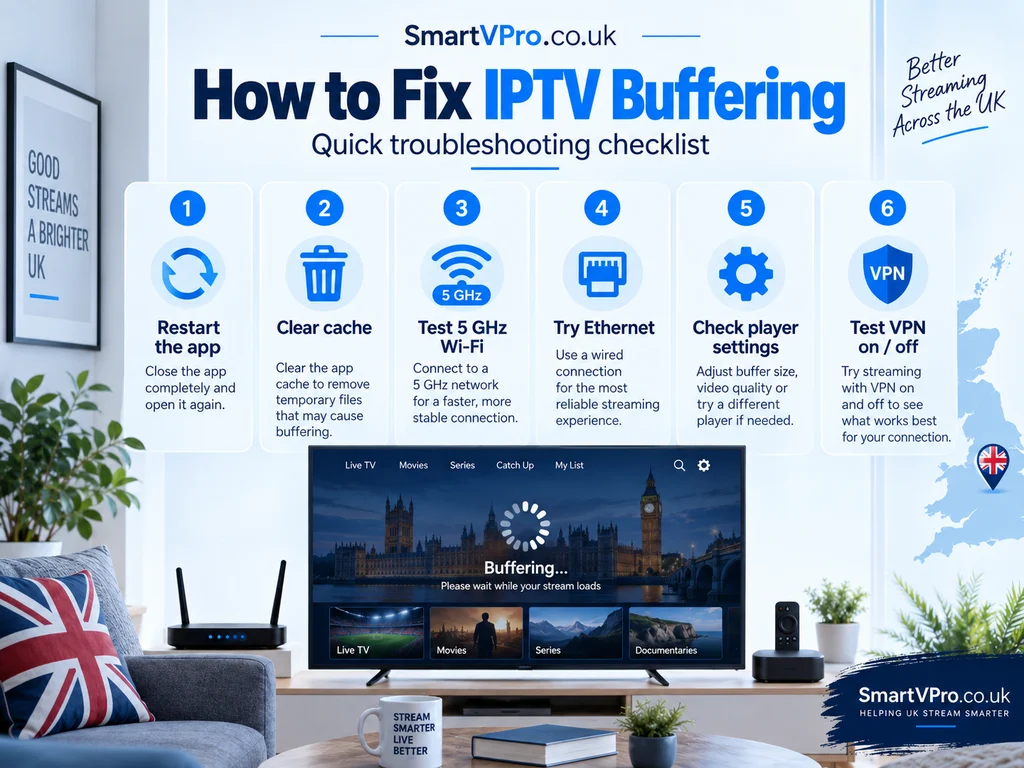
- A go-to fix for IPTV buffering UK: Switch to 5GHz Wi-Fi, or use Ethernet. Open your Wi-Fi settings on the device and look for a network name ending in “5G” or “5GHz” — connect to that instead of the 2.4GHz one. If your device has an Ethernet port (or supports a USB-to-Ethernet adapter, as many Fire TV Sticks do), a wired connection removes Wi-Fi interference entirely. This single change fixes the majority of buffering complaints.
- Worth doing for IPTV buffering UK: Move the router, or move closer to it. Wi-Fi signal degrades through walls and floors. A router in a hallway cupboard reaches a living-room TV far worse than one on an open shelf nearby. If moving either isn’t practical, a mesh Wi-Fi extender near the TV can help.
- This tackles IPTV buffering UK directly: Clear the app’s cache. On Android-based devices this is usually Settings → Applications → Manage Installed Applications → your IPTV app → Clear cache. Do this every couple of weeks rather than waiting for problems to appear.
- An effective IPTV buffering UK fix: Close background apps and restart the device. Streaming boxes and sticks run out of memory more easily than a phone or laptop. Force-close anything you’re not using and restart the device weekly.
- Try this for IPTV buffering UK: Change the decoder setting. Look for Player, Playback or Decoder settings inside the app and try the alternatives — Hardware, Hardware+ and Software are the usual options. If one stutters, another often plays the same channel smoothly, because it uses a different part of the device’s chip.
- This is a fast IPTV buffering UK fix: Check your actual speed at the TV, not on your broadband bill. Run a speed test on a phone standing next to the streaming device. If it shows far less than your broadband plan promises, the fault is the Wi-Fi or router position, not your internet contract.
- For IPTV buffering UK, try this: Reduce the number of devices streaming at once. If several TVs or phones share one login, try pausing the others to see whether a single stream is stable — that points to a connection-count issue rather than a network one.
- A reliable IPTV buffering UK fix: Turn off a VPN and test again. If you use a VPN for privacy, disconnect it briefly. If buffering disappears, the VPN server you picked is the bottleneck, not your IPTV service.
- One of the quickest ways to stop IPTV buffering UK: Try a different stream format, if the app offers one. Some players let you choose between MPEG-TS and HLS (sometimes labelled M3U8). TS tends to be the more stable option for live sport; switch to it if the app defaults to HLS and struggles.
- This step alone often resolves IPTV buffering UK: Free up storage. A device with almost no storage left slows down across every app, IPTV included. Uninstall anything you no longer use.
Device-specific fixes
The general steps above apply everywhere, but each device has its own settings menus and quirks worth knowing.
Amazon Fire TV Stick
If IPTV buffering UK shows up on a Fire TV Stick, start here. Go to Settings → Network and confirm you’re on the 5GHz network. In the IPTV app itself, look for the decoder option under Player or Playback settings and try Hardware, then Hardware+, then Software if one stutters. Clear the app’s cache under Settings → Applications → Manage Installed Applications. Fire TV Sticks have limited memory, particularly the Lite and HD models, so restarting weekly (Settings → My Fire TV → Restart) makes a noticeable difference on large channel lists. A Fire TV Stick 4K or 4K Max handles heavier apps like TiviMate more comfortably than the Lite. For the full setup process, see our IPTV on Firestick guide.
Android TV / Android box
IPTV buffering UK on an Android TV box usually responds to these steps. Android TV boxes and dedicated Android boxes behave similarly to a Firestick but usually have more memory and a proper Ethernet port, worth using if the box sits near the router. Check Settings → Network & Internet for the connection type and band. Because these devices install apps from the Google Play Store, updates happen automatically — keep the player app updated, since decoder bugs are often fixed in later versions.
Samsung Smart TV
For IPTV buffering UK on a Samsung Smart TV, try this first. Samsung TVs (running Tizen) can’t sideload player apps like TiviMate; they run apps such as IBO Player Pro or Smart IPTV from the Samsung Apps store instead. If picture quality drops or the stream stutters, check Settings → General → Network Status to confirm the TV is on 5GHz, and try the app’s alternative player engine if it offers one — Samsung’s own decoding hardware sometimes struggles with certain stream formats that a software player handles fine. Turning off the TV’s motion smoothing feature (often called Auto Motion Plus) has also been reported to help with occasional stutter, since it processes every frame before display.
LG Smart TV
IPTV buffering UK on an LG Smart TV often comes down to the same handful of settings. LG TVs (running webOS) work the same way as Samsung for IPTV — no sideloading, so an app like IBO Player Pro or Smart IPTV from the LG Content Store is the way in. Check the network connection under Settings → Network, and reload the playlist from the app if channels stutter after a long period of use, since some webOS apps hold onto memory across sessions.
Apple TV
Apple TV is usually reliable, but IPTV buffering UK can still happen here. IPTV apps on Apple TV (such as IPTV Smarters or IBO Player Pro) come from the App Store, so updates arrive automatically. Confirm the Apple TV is on 5GHz under Settings → Network, and if you’re mirroring or AirPlaying from an iPhone rather than running the app natively on the Apple TV, try running the app directly on the Apple TV instead — AirPlay adds another layer of processing and network traffic that can introduce its own stutter, separate from the IPTV stream itself.
iPhone / iPad
IPTV buffering UK on a phone or tablet has its own set of causes. On a phone or tablet, background app refresh and low-power mode can both throttle a streaming app’s performance. Check Settings → General → Background App Refresh is allowed for your IPTV app, and turn off Low Power Mode while watching. If you’re sending the picture to a TV via AirPlay, a weak Wi-Fi signal on the phone affects both the phone’s playback and the AirPlay stream, so test on the phone alone first to isolate the cause.
Windows / Mac
On a computer, IPTV buffering UK is often about the browser or app, not the network. On a computer, an IPTV app or VLC playing an M3U link is usually more stable than on a stick, simply because there’s more processing power available. If a channel stutters, check the app’s decoder or renderer setting — desktop apps often let you switch between hardware acceleration and software rendering — and close bandwidth-heavy background tasks like cloud backups or large downloads, which can starve a live stream of bandwidth on the same connection.
MAG / Formuler
IPTV buffering UK on MAG and Formuler boxes tends to need a slightly different fix. MAG and Formuler boxes use a built-in portal rather than a downloadable app, so there’s no player-app cache to clear in the usual sense. If a channel buffers, check the box’s network settings for the connection type first (wired is standard for MAG boxes and preferable to Wi-Fi), and ask your provider to confirm the portal URL and MAC address are correctly matched to your subscription, since a mismatch here can cause intermittent playback issues that look like buffering but are actually a connection fault.
IPTV app-specific fixes
It helps to keep two things separate: the IPTV player (the app that displays channels) and the IPTV subscription (the login that supplies them). Buffering is almost always an app or network problem, not a subscription problem — the same login usually plays perfectly in a different app on the same device.
TiviMate
IPTV buffering UK inside TiviMate usually points to one of these settings. Under Settings → Playback → Decoder, start with Hardware; if sport channels stutter or show a black screen, move to Hardware+ and then Software. Settings → Playback → Buffer size is worth raising to Medium or Large on Wi-Fi, which smooths out short dips at the cost of a slightly longer start-up time; keep it on Small only if you’re on Ethernet. The stream format setting under your playlist’s properties (MPEG-TS vs HLS) is also worth switching if one format struggles. Our TiviMate setup guide covers the full settings list.
IPTV Smarters Pro
In IPTV Smarters Pro, IPTV buffering UK is often solved the same way. Under Settings → Player selection, try switching between the native player and ExoPlayer — this is the same idea as TiviMate’s decoder setting, just named differently. Clearing the app’s cache and reducing the number of channel groups shown (hide countries and categories you don’t watch, under Manage categories) both reduce how much the app has to process when building the guide.
IBO Player Pro
IBO Player Pro has its own quirks that can cause IPTV buffering UK. Because IBO Player Pro is used heavily on Samsung and LG TVs, the most common fix is switching the player engine in Settings if a channel shows a black screen or stutters — the app typically offers more than one playback engine, and they don’t perform identically on every TV model. If the playlist itself seems to load slowly, reload it from the developer’s activation website rather than just restarting the app. Our IBO Player Pro guide covers activation and settings in full.
XCIPTV
IPTV buffering UK in XCIPTV usually traces back to one of these settings. XCIPTV is a lighter alternative to IPTV Smarters, often used on older or lower-memory Fire TV Stick models. Its decoder options live under a similar Playback settings menu; because the app itself is deliberately lightweight, buffering on XCIPTV more often points to the network or the device than the app, so it’s worth working through the general Wi-Fi and device fixes above first.
Internet speed and network requirements
Buffering is often blamed on internet speed when the real issue is Wi-Fi band or router placement, so it’s worth testing properly rather than guessing. Run a speed test on a phone standing next to the streaming device, not on a laptop connected directly to the router — you want the speed actually reaching the TV, not the speed the router receives. Our guide to IPTV streaming in the UK sets out the exact Mbps needed for SD, HD, Full HD and 4K, and it’s worth checking your result against that table before assuming your broadband plan is too slow.
A few things matter more than the headline number:
- A go-to fix for IPTV buffering UK: Ethernet beats Wi-Fi for stability, not just speed — a wired connection removes interference entirely, which is why it fixes intermittent buffering that a speed test alone doesn’t explain.
- Worth doing for IPTV buffering UK: 5GHz beats 2.4GHz for the same reason: less competition from neighbouring networks and household devices.
- This tackles IPTV buffering UK directly: Router placement affects real-world speed more than most people expect. A router behind a TV cabinet, inside a cupboard or on the floor loses signal that one placed centrally and elevated would keep.
- An effective IPTV buffering UK fix: Latency and packet loss, not just download speed, explain buffering that a fast speed test doesn’t. If your connection is congested at peak time, packets can arrive late or need re-sending even when the advertised speed is available.
- Try this for IPTV buffering UK: Run a speed test during the problem, not the next morning. A connection that tests fine at 11am can be genuinely congested at 8pm if your household or your street is under heavier load.
When a VPN can help — and when it can make things worse
A VPN is not required to use IPTV, and its effect on buffering depends entirely on the server you connect to — it isn’t a blanket improvement or a blanket problem.
Where it can help: if your ISP is actively slowing or shaping certain types of streaming traffic (sometimes called throttling), routing your connection through a VPN can bypass that shaping and restore your normal speed. This varies by ISP and isn’t universal — not every UK broadband provider does this, and you may not be affected even if yours does.
Where it can make things worse: every VPN adds an extra step between your device and the provider’s servers, and that step costs some speed. Connect to a VPN server on the other side of the world and you can lose enough speed to cause the exact buffering you were trying to avoid. Server load matters too — a popular VPN server handling thousands of other users’ traffic at once behaves like an overloaded IPTV server: fine most of the time, slow at peak hours.
How to test properly: watch the same channel for a few minutes with the VPN on, then turn it off and watch again. If buffering only happens with the VPN active, try a different, nearby server before giving up on the VPN altogether — a UK or Western European server is usually the fastest choice for a UK-based IPTV subscription. If buffering happens either way, the VPN isn’t the cause.
How to tell whether the problem is your device, internet, app or provider
If you’ve tried the general fixes and something still isn’t right, this sequence narrows it down.
- This is a fast IPTV buffering UK fix: Test another channel. If only one channel buffers and everything else is fine, the fault is more likely with that specific stream on the provider’s end, especially during a live event.
- For IPTV buffering UK, try this: Restart the app. A quick close-and-reopen clears a surprising number of temporary glitches.
- A reliable IPTV buffering UK fix: Test another device, if you have one. If a phone on the same Wi-Fi plays smoothly but the Firestick doesn’t, the fault is the Firestick or its app, not your broadband.
- One of the quickest ways to stop IPTV buffering UK: Switch to Ethernet or 5GHz Wi-Fi if you haven’t already, and test again immediately.
- This step alone often resolves IPTV buffering UK: Test with the VPN on and off, if you use one, watching the same channel both times.
- A go-to fix for IPTV buffering UK: Try a different player app with the same login. If the subscription plays perfectly in a second app, the problem was the first app’s settings, not the subscription.
- Worth doing for IPTV buffering UK: Contact your provider’s support if the issue remains after all of the above, telling them exactly which channel, which device and what time of day — that detail is what lets a provider check server load or move you to a different stream. If you’re shopping around or considering a change, our guide to choosing a UK IPTV provider explains what a properly run service looks like.
Frequently asked questions
Why does my IPTV keep buffering at 8pm specifically?
This is the single biggest driver of IPTV buffering UK in the evening. 8pm and other peak viewing times see the heaviest demand on both home broadband (everyone in the house is online) and the provider’s servers (everyone’s subscription is active at once). Try the network fixes above first, since a busy household Wi-Fi network is often the simpler explanation.
Does a faster broadband plan fix IPTV buffering?
Not always — IPTV buffering UK isn’t only about speed. Sometimes, but not always. Many UK buffering problems come from Wi-Fi band, router placement or device settings rather than a genuine lack of bandwidth — check your actual speed at the device before upgrading your broadband plan.
Why does IPTV buffer on Wi-Fi but not on mobile data?
This is a telling sign when diagnosing IPTV buffering UK. This usually points to the home Wi-Fi network rather than the IPTV service itself — either the 2.4GHz band, a distant router, or interference from other devices. Switching to the 5GHz band or Ethernet is the first thing to try.
Can a bad HDMI cable cause buffering?
Rarely, but it’s worth ruling out when troubleshooting IPTV buffering UK. No — an HDMI cable carries picture and sound from the streaming device to the TV and has no effect on the stream arriving over the network. A poor HDMI cable can cause a different problem (a flickering or dropping picture, or no signal), which is worth distinguishing from buffering.
Does clearing the app cache delete my channel list?
No — and this is a safe first step for IPTV buffering UK. No, on most IPTV apps clearing the cache removes temporary files like thumbnails and logos, not your saved playlist or login — the channel list simply reloads the next time you open the app.
Is it my device or the IPTV provider?
This is the key question behind most IPTV buffering UK reports. Test another device or another app with the same login, as covered in the diagnostic sequence above. If the same channel buffers everywhere, it’s more likely a provider or network issue; if it only happens on one device or app, it’s local to that device or app’s settings.
Why does only one channel buffer while the rest are fine?
This points to a specific, fixable cause of IPTV buffering UK. This is a strong sign the issue sits with that specific stream on the provider’s side, particularly during a live event when one popular channel can see far more simultaneous viewers than the rest.
Should I turn my VPN off completely for IPTV?
Not necessarily — for IPTV buffering UK, a VPN can help or hurt depending on the server. Not necessarily — test with it on and off first. If a nearby, fast server doesn’t cause buffering, there’s no need to give up the privacy benefit of using one.
Does IPTV buffering mean my subscription is bad?
Not usually — IPTV buffering UK is rarely about the subscription itself. Not on its own. Persistent buffering on one specific channel at peak time, across multiple devices and networks, is a reasonable sign to raise with your provider — but buffering on a single device that clears up after a Wi-Fi or decoder change is a local fix, not a subscription problem.
Conclusion
Most IPTV buffering UK problems come down to Wi-Fi band, device memory or an app’s decoder setting — all of which you can fix yourself in a few minutes without contacting anyone. Work through the general fixes first, use the device and app sections for anything specific to your setup, and run the diagnostic sequence if the cause still isn’t obvious. If you’ve ruled out your own network and device and a channel still buffers consistently at peak time, that’s worth raising directly with your provider. Testing a service properly, on your own connection, is the only reliable way to know whether a provider will hold up during a Saturday afternoon of football — SmartVPro’s 24-hour trial exists for exactly that reason.

Get the next IPTV guide by email
New setup guides, app comparisons and buffering fixes for UK viewers – about two emails a month, no spam, unsubscribe in one click.