
A UK IPTV service delivers live television and on-demand video to your TV over your broadband connection instead of through an aerial, a satellite dish or a cable box. You pay a subscription, receive a login, add it to a player app on a Smart TV, Firestick or phone, and the channels appear in a guide much like Sky or Freeview. That is the short version. The longer version, which is what this guide covers, is what a UK IPTV service actually includes, how the streams reach your screen, the broadband you need, where the law stands, and how to judge a service before you hand over any money.
This is an explainer rather than a ranking. If you already understand IPTV and want a checklist for comparing providers, our guide to choosing a UK IPTV provider and the ten criteria for judging any IPTV service go deeper on that. Here we start from the beginning, with what a UK IPTV service actually is.
Key facts
- What a UK IPTV service is: a subscription that streams live channels, catch-up and on-demand video over the internet to a player app on your TV or device
- What you receive: a login (usually an M3U URL or Xtream Codes details), not a box or a dish
- Devices: Samsung and LG Smart TVs, Amazon Firestick, Android TV, Apple TV, iPhone and Android phones, Windows and Mac
- Broadband: roughly 10 Mbps per HD stream and 25 Mbps or more for 4K, with a stable connection mattering more than headline speed
- Typical UK price: around £10 to £15 a month, or £45 to £60 a year for one device
- Legal position: the technology is legal and used by BT, Sky and Virgin Media; what matters is whether the provider has the right to distribute the content and whether you hold a TV Licence for live TV
Table of Contents
What is a UK IPTV service?
A UK IPTV service is a subscription that streams live TV channels, catch-up programmes and on-demand films and series over the internet to UK viewers. IPTV stands for Internet Protocol Television. Rather than tuning into a broadcast signal, your TV or streaming device requests each channel from the provider’s servers and plays it back as a video stream, in the same way that BBC iPlayer or Netflix deliver their content.
The word “service” matters. You are not buying a piece of hardware. You are paying for access, for a fixed period, to a catalogue of channels and video that the provider hosts and maintains. When the subscription ends, the login stops working and the app simply shows nothing. That is why the quality of the provider, rather than the quality of your TV, decides most of your experience.
It also helps to be clear about what a UK IPTV service is not. It is not a Freeview replacement that plugs into your aerial socket, and it is not the same as a streaming app such as Disney+ that carries a single company’s catalogue. It sits in between: a broad, multi-channel line-up like pay TV, delivered like a streaming app. Our guide to IPTV versus satellite, cable and streaming bundles compares those models side by side.
How does a UK IPTV service work?
A UK IPTV service works in four steps: the provider encodes channel feeds into video streams on its servers, those streams travel across the internet to your home broadband, a player app on your device requests the channel you select using your login, and the device decodes and plays the video. Everything happens in a few seconds, and the app hides the mechanics behind a familiar channel list and programme guide.
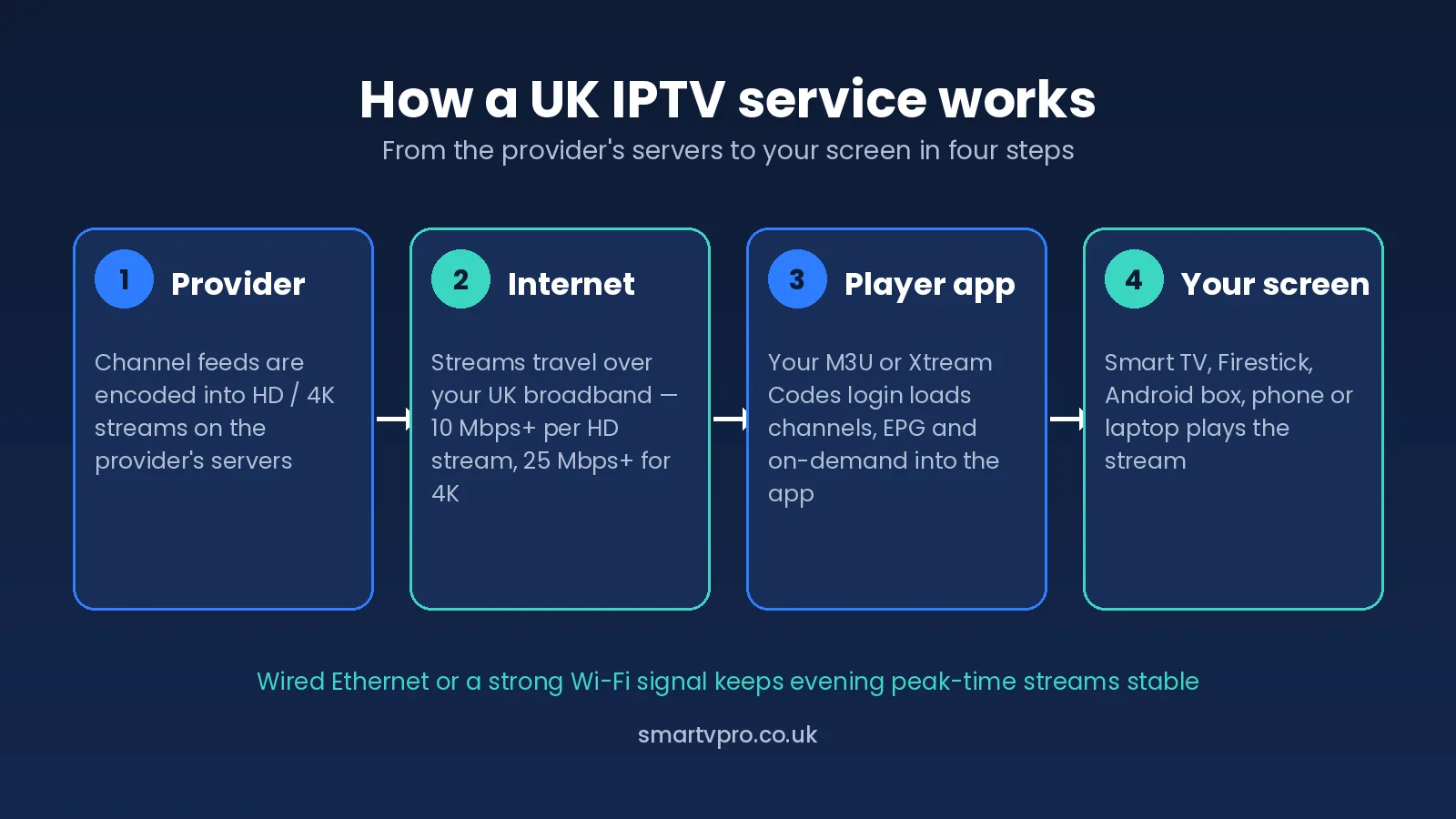
Step 1: the provider’s servers
The provider takes each channel feed, compresses it into a streaming format (usually H.264 or H.265 video inside an HLS or MPEG-TS stream) at one or more quality levels, and hosts it on servers designed to serve thousands of viewers at once. This is the part you never see, but it is where reliability is won or lost. A provider that skimps on server capacity will look fine at 2pm on a Tuesday and fall over at 8pm on a Saturday when everyone tunes into the football.
Step 2: the journey across the internet to your broadband
Each stream is sent over the public internet to your router. The route it takes depends on where the provider’s servers sit and how well they connect to UK internet exchanges. For UK viewers, servers with good connectivity into the UK and Western Europe tend to mean lower latency and fewer dropped segments than servers routed through distant regions. You cannot inspect this yourself, but you can measure its effect during a trial at peak time.
Step 3: your login and the player app
When you subscribe, you receive credentials in one of two common formats. An M3U playlist is a single URL that lists every channel and stream address. Xtream Codes credentials are a server address, a username and a password that the app uses to fetch channels, the electronic programme guide (EPG) and the on-demand library separately. Most modern IPTV apps in the UK accept both. Which format you use makes little difference to picture quality; Xtream Codes tends to give a tidier on-demand section and faster loading.
Step 4: playback on your screen
The app buffers a few seconds of video ahead of what you are watching and plays it. If the stream arrives faster than it is consumed, playback is smooth. If it arrives slower, even briefly, you see the spinning wheel. That is the entire story of buffering, and it explains why the same UK IPTV service can be flawless in one home and frustrating in another. We cover the causes in detail in how to fix IPTV buffering in the UK.
What does a UK IPTV subscription include?
Every IPTV subscription UK providers sell is built from the same handful of components, although the depth and quality of each varies enormously. Knowing the components helps you compare like with like, and it helps you spot a listing that is quietly missing something.
| Component | What it means | What to check |
|---|---|---|
| Live channels | The core line-up: UK terrestrial, entertainment, sport, news, kids and international channels | Are the UK channels you actually watch present in HD, not just listed? |
| EPG (programme guide) | The grid that shows what is on now and next, in UK time | Is it populated for the main UK channels and correct to the minute? |
| Catch-up | Replay of programmes broadcast in the last few days on selected channels | Which channels support it, and for how many days? |
| Video on demand (VOD) | A library of films and series you can start at any time | Is it organised and searchable, or a raw dump of titles? |
| Connections | How many devices can stream at the same time on one login | Does the plan match the number of TVs in your home? |
| Support | Help when a channel drops or a login fails | Is it staffed in UK hours, and how fast does it reply? |
Channel counts are the number every provider leads with and the one that tells you least. A line-up of 34,000 channels sounds impressive, but what matters for a UK household is whether BBC One, ITV1, Channel 4 and the handful of others you actually watch are stable and in HD at peak time. Our UK IPTV channel list shows how a well-organised UK line-up should look.
What makes an IPTV service genuinely UK-focused?
Plenty of providers put “UK” in their name. Far fewer are built around UK viewers. A UK IPTV service that deserves the label usually shows the following signs, and they are worth checking one by one before you subscribe.
- Pricing in pounds sterling. If prices are quoted in dollars or euros, the provider is not primarily serving the UK, and your bank may add conversion fees.
- A UK-first channel line-up. The UK terrestrial channels, UK sport and UK regional variants should sit at the top of the list, not be buried under hundreds of channels from elsewhere.
- An EPG in UK time. A guide that is an hour out, or shows the wrong schedule, is a sign that the provider has not tuned the service for British viewers.
- Capacity planned around UK peak time. UK viewing peaks between roughly 7pm and 11pm, and on Saturday afternoons and evenings during the football season. A UK-focused provider provisions for that.
- Support in UK hours. Help that only answers at 3am is no help when a match kicks off at 3pm.
- Published legal pages. Terms and conditions, a refund policy and a privacy policy written with UK consumer law in mind, rather than copied boilerplate.
None of these guarantees a good service on its own, but a provider that fails several of them is unlikely to be one you want a 12-month relationship with. The guide to UK-focused providers versus overseas resellers explains the difference in more detail.
Which devices and IPTV apps do UK viewers use?
One of the practical advantages of a UK IPTV service is that it runs on hardware you probably already own. You do not need a set-top box from the provider. You need a device that can run an IPTV player app, and in the UK that covers almost every TV and streaming device sold in the last five or six years.
| Device | Typical apps | Notes for UK viewers |
|---|---|---|
| Amazon Firestick / Fire TV | TiviMate, IBO Player Pro, IPTV Smarters | The most popular route in the UK because it is cheap and works on any TV with an HDMI port. See our Firestick IPTV setup guide. |
| Samsung and LG Smart TVs | IBO Player Pro, Smarters, SmartOne | Apps install from the TV’s own store, so no extra hardware is needed. Older models may lack the app; a Firestick solves that. |
| Android TV / Google TV boxes | TiviMate, IPTV Smarters | Powerful and flexible; TiviMate on Android TV is the choice of many UK enthusiasts. See the TiviMate guide. |
| Apple TV, iPhone and iPad | IBO Player Pro, Smarters, GSE Smart IPTV | Fewer app choices than Android but the main ones are well maintained. |
| Windows and Mac | IPTV Smarters, VLC, MyIPTV Player | Useful for a second screen or for testing a login quickly. |
| MAG and Formuler boxes | Built-in portal or Stalker | Dedicated IPTV boxes, popular with long-standing users; setup uses a portal URL rather than an M3U. |
Our comparison of the best IPTV player apps for UK viewers goes through each app’s strengths, and the IPTV installation tutorials walk through UK IPTV service setup screen by screen for every device above.
What broadband does a UK IPTV service need?
A UK IPTV service needs a stable connection more than a fast one. As a rule of thumb, allow around 5 to 8 Mbps for an HD stream, 8 to 12 Mbps for Full HD and 25 Mbps or more for 4K, per device streaming at the same time. Most UK homes on fibre-to-the-cabinet or full-fibre broadband have more than enough headline speed. The problems, when they come, are usually about consistency: Wi-Fi interference, a congested evening connection or an old router.
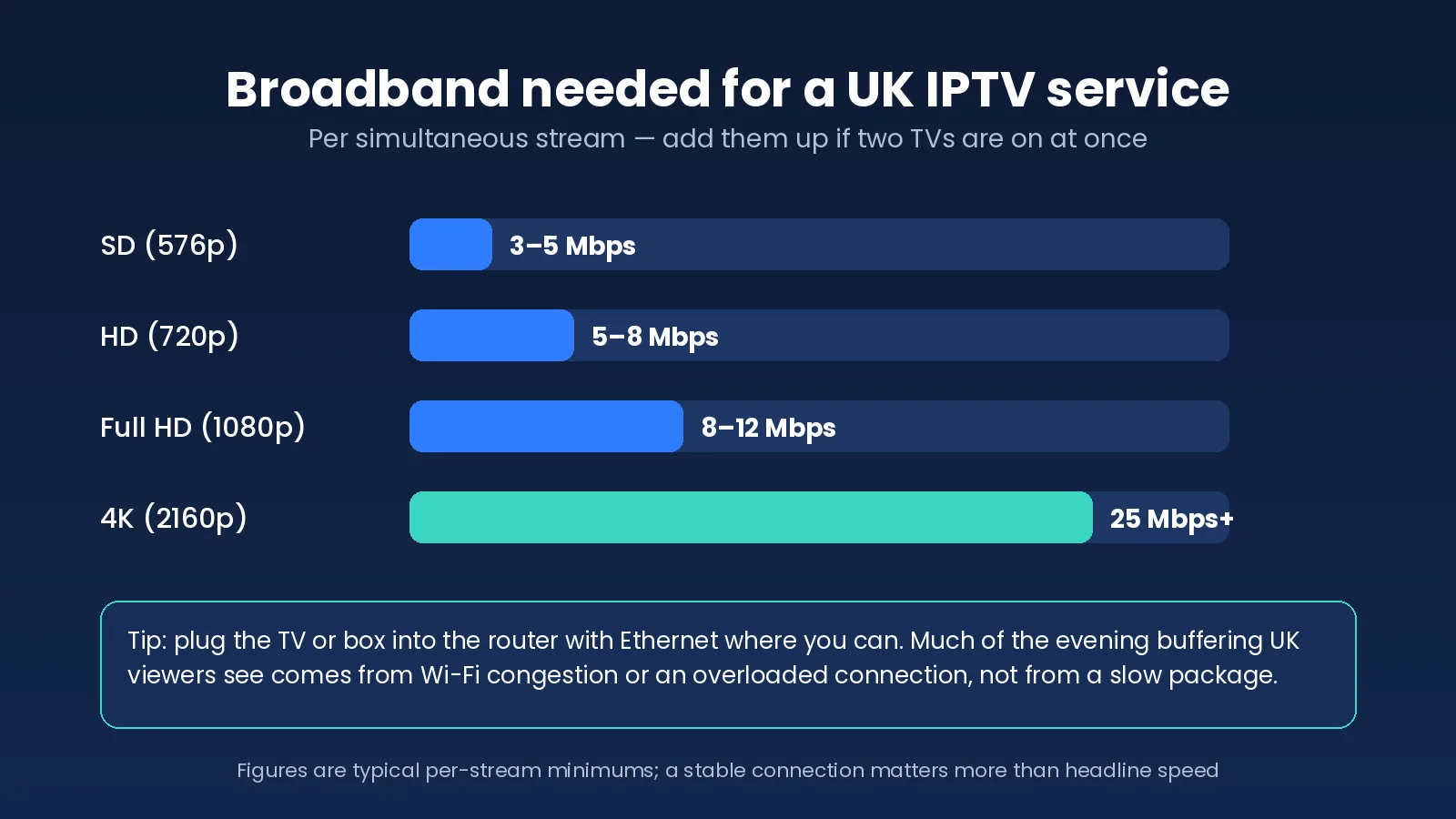
Three practical points make more difference than upgrading your package:
- Use Ethernet where you can. A cable from the router to the TV or box removes Wi-Fi from the equation entirely. If the router is in the hallway, a pair of powerline adapters or a mesh Wi-Fi node near the TV is the next best thing.
- Test at peak time, not at lunchtime. Run a speed test at 8pm on a weekday and again on a Saturday evening. If your download speed drops sharply, the connection itself is congested and no provider can fix that for you.
- Count the streams. Two TVs on 4K plus someone gaming upstairs adds up quickly. Match the number of simultaneous streams to what your connection can comfortably carry.
Ofcom’s broadband coverage and speeds pages are worth a look if you want to check what is available at your address and understand what the speed figures on your package actually mean.
Streaming quality: HD, 4K and what affects it
IPTV streaming UK viewers receive is typically offered in SD, HD, Full HD and, for a growing number of channels and on-demand titles, 4K. The label on the channel is only half the story. Picture quality depends on the bitrate the provider encodes at, and two “HD” streams can look very different if one is compressed hard to save bandwidth. A well-run UK IPTV service encodes UK channels at bitrates that hold up on a large TV, and it is honest about which content is truly 4K rather than an upscaled HD feed.
Beyond bitrate, four things shape what you see on screen:
- Server load at peak time. The most common cause of a good service turning bad on a Saturday evening.
- Your home network. Wi-Fi drop-outs and interference cause far more freezes than slow broadband packages.
- The player app and its buffer settings. A larger buffer smooths out small hiccups at the cost of a slightly longer channel-change time.
- The device’s decoding power. An older Firestick or budget Smart TV can struggle with high-bitrate 4K, whatever the connection.
For a fuller explanation of what “4K” really means in IPTV and how bitrate and resolution interact, read IPTV streaming in the UK explained.
Is IPTV legal in the UK?
IPTV as a technology is entirely legal in the UK. BT TV, Sky Stream, Virgin Media Stream, NOW and BBC iPlayer all deliver television over the internet, which is exactly what IPTV means. The legal question about any UK IPTV service is never about the delivery method. It is about whether the provider has the right to distribute the specific channels and content it offers, and about your own obligations as a viewer.
Two points are worth stating plainly, because a lot of marketing skips over them:
- You need a TV Licence to watch live TV in the UK, however it reaches you. That includes live channels streamed through an IPTV app. The official guidance is on the GOV.UK TV Licence page.
- Distributing copyrighted content without permission is unlawful in the UK, and enforcement in recent years has focused on the operators and sellers of unauthorised services. A provider that will not publish its legal terms, refund policy or company details is giving you a clear signal about how it operates.
As a consumer, you also have rights when you buy a digital service from a UK-facing business, including clear pre-contract information and the ability to seek a refund if the service is not as described. GOV.UK summarises consumer protection rights in plain English. We are not lawyers, and this is general information rather than legal advice; if you are unsure about a specific service, read its terms and ask the provider directly.
How to evaluate a UK IPTV service before you pay
The most reliable way to evaluate a UK IPTV service is to test it in your own home, on your own devices, at the time of day you actually watch television. Everything else is a proxy. A structured 24-hour trial tells you more than any review, including this one. Here is a sequence that takes under an hour of active effort.
- Check the basics on the website first. GBP pricing, a written refund policy, published terms, a contact route that is not just a chat widget, and a trial you can buy rather than beg for.
- Set up on the device you will really use. Not a laptop for convenience. If the family watches on a Samsung TV, test on the Samsung TV.
- Watch between 8pm and 10pm. Flick between the main UK channels and at least one live sports channel. Note any freezes, drops to a lower quality or channels that fail to load.
- Test the guide and catch-up. Does the EPG show the right programme for BBC One right now? Does catch-up on ITV1 actually play?
- Search the on-demand library. Look for three titles you would genuinely watch. Check they play and are in the quality advertised.
- Contact support with a real question. Time the reply and judge whether a human answered it.
- Decide on a short plan first. Even a service that passes every test deserves a month before it earns a year.
If you want a weighted scoring sheet rather than a checklist, the ten criteria for judging IPTV providers in the UK gives each factor a percentage so you can compare two services numerically. And if you want to understand the difference between a provider, a reseller and a panel before you buy, how to choose a UK IPTV provider explains it.
How much does a UK IPTV service cost?
A UK IPTV service typically costs between £10 and £15 a month on a rolling plan, with annual plans working out at roughly £4 to £5 a month. Extra simultaneous connections on a UK IPTV service add a few pounds each. Anything dramatically cheaper usually means a reseller with no control over the servers, and anything dramatically more expensive should come with a clear explanation of what you are paying for.
For context, SmartVPro’s own plans at the time of writing are £10.99 for one month, £21.99 for three, £29.99 for six and £47.99 for twelve, all for one device, with a 24-hour full-access trial for £1. Two of our guides look at pricing in depth: IPTV cost in the UK covers real prices in pounds across the market, and cheap IPTV in the UK explains what each price tier actually buys you.
Common UK IPTV service problems and quick fixes
Most problems with a UK IPTV service fall into a small number of categories, and most of them can be fixed in a few minutes without contacting anyone. Work through the table from top to bottom before assuming the service is at fault.
| Symptom | Most likely cause | Quick fix |
|---|---|---|
| Buffering every few minutes at night | Wi-Fi congestion or evening broadband slowdown | Switch to Ethernet or a mesh node; run a peak-time speed test; raise the app buffer size |
| Some channels play, others show an error | Individual stream down, or the wrong stream format selected | Try the channel’s HD or SD variant; refresh the playlist; report the specific channel to support |
| Login stops working suddenly | Subscription expired, or too many devices connected at once | Check the expiry date; close the app on other devices; re-enter credentials carefully |
| EPG blank or showing the wrong programmes | EPG URL not set in the app, or the guide not refreshed | Enter the provider’s EPG link in the app settings and force a guide update |
| Stuttering on 4K only | Device cannot decode the stream smoothly, or bandwidth too low for 4K | Use the HD version of the channel; try a newer device; use a wired connection |
| Audio out of sync | Player decoder mismatch | Switch the app between hardware and software decoding |
The detailed troubleshooting guide, IPTV buffering in the UK and how to fix it, goes step by step through the network side, and the IBO Player Pro guide and TiviMate guide cover the app settings that matter.
UK IPTV service glossary
The IPTV world uses a lot of shorthand. These are the terms you will meet most often when reading about or setting up a UK IPTV service.
- M3U: a plain-text playlist file, usually supplied as a URL, listing every channel and its stream address.
- Xtream Codes (XC): a login format made up of a server URL, username and password that lets an app load live TV, EPG and on-demand separately.
- EPG: the electronic programme guide, the on-screen grid showing what is on now and next.
- Catch-up: the ability to replay a programme broadcast in the last few days on a supported channel.
- VOD: video on demand, the library of films and series available at any time.
- Connection: one simultaneous stream. A “two-connection” plan allows two devices to watch at the same time.
- Provider: a business that runs its own servers and streams. A reseller sells access to someone else’s servers, and a panel is the reseller’s control system for creating logins.
- Buffering: the pause that occurs when the app runs out of downloaded video before the next segment arrives.
- Bitrate: the amount of data used per second of video; higher bitrates generally mean sharper pictures and larger bandwidth needs.
- Stalker / portal: the login method used by MAG-style boxes, based on a portal URL and the device’s MAC address rather than a username.
How SmartVPro works as a UK IPTV service
Since this guide sits on SmartVPro’s site, it is only fair to say where we fit into it. SmartVPro is a UK IPTV service priced in pounds, with UK channels at the front of the line-up, an EPG in UK time, catch-up on the major UK channels, a library of films and series, and support that answers on WhatsApp during the hours UK viewers actually watch. Plans run from one month to twelve, with no contract, and a written 7-day money-back guarantee. The full offer is set out on our IPTV UK subscription page.
We would rather you tested that than took our word for it, which is why the trial is a paid, full-access 24 hours rather than a limited demo. Everything in the evaluation section above applies to us as much as to anyone else, and you can read what existing customers have said on our customer reviews page.
Try a UK IPTV service for 24 hours before you commit
The 24-hour SmartVPro trial costs £1, includes every channel and on-demand title, works on one device and ends automatically with nothing to cancel. Use it to run the peak-time test above on your own TV. If it passes, the IPTV subscription plans start at £10.99 for a month. If it does not, you have spent a pound and learned something useful about your home network.
UK IPTV service FAQ
What is a UK IPTV service in simple terms?
It is a subscription that streams live TV channels, catch-up and on-demand films and series over your broadband to an app on your Smart TV, Firestick, phone or computer. You receive a login rather than a box, and the channels appear in a guide much like Sky or Freeview.
Do I need a TV Licence to use a UK IPTV service?
Yes, if you watch or record live TV through it. UK law requires a TV Licence to watch live television on any channel or service, whatever the delivery method, including internet streaming. GOV.UK has the current rules.
What internet speed do I need for a UK IPTV service?
Allow around 5 to 8 Mbps per HD stream, 8 to 12 Mbps for Full HD and 25 Mbps or more for 4K, per device watching at the same time. A stable connection matters more than headline speed, so use Ethernet where you can and test at peak time.
Does a UK IPTV service work on a Samsung or LG Smart TV?
Yes. IPTV player apps such as IBO Player Pro and IPTV Smarters install directly from the Samsung and LG app stores. Older TVs without the app can use an Amazon Firestick plugged into an HDMI port instead.
What is the difference between an M3U and Xtream Codes login?
An M3U is a single playlist URL listing every channel. Xtream Codes is a server address, username and password that lets the app load live TV, the programme guide and on-demand separately. Most UK IPTV apps accept both, and Xtream Codes usually gives a tidier on-demand section.
Why does my IPTV buffer in the evening but not during the day?
Evening buffering is usually caused by either your home network (Wi-Fi congestion, a busy broadband line) or the provider’s servers being overloaded at UK peak time. Test on Ethernet with a speed test at 8pm to tell the two apart; if your connection holds up and the service does not, the provider is the problem.
How many devices can I use with one UK IPTV subscription?
It depends on the number of connections in your plan. One connection means one device streaming at a time, although you can usually install the login on several devices and use them one at a time. Multi-connection plans cost a little more and allow simultaneous viewing.
Should I pay for a year of a UK IPTV service up front?
Not until you have tested it. Run a paid trial at peak time on your own device, then take a one-month plan. Only move to an annual plan once the service has proved stable through a full month, including weekend sport.
Is a cheap UK IPTV service worth it?
Sometimes, but very low prices often indicate a reseller with no control over server capacity, which shows up as evening buffering and channels that quietly disappear. Judge a service on peak-time stability, EPG accuracy and support, and treat price as the last factor rather than the first.
The short version
A UK IPTV service is a subscription, not a gadget: live channels, catch-up and on-demand delivered over your broadband to an app on the devices you already own. The technology is the same one Sky, BT and the BBC use. What separates a good service from a poor one is capacity at UK peak time, an accurate guide, honest pricing in pounds, published terms and support that answers. None of that can be judged from a channel count, so test it yourself, on your own TV, at 8pm on a Saturday, before you commit to anything longer than a month.
Read more: IPTV UK Explained for 2026: What British Viewers Actually Get — our companion guide on Medium.
Get the next IPTV guide by email
New setup guides, app comparisons and buffering fixes for UK viewers – about two emails a month, no spam, unsubscribe in one click.