
Quick answer: IPTV and OTT both deliver TV over internet technology, but they differ in which network carries the video and who controls it. Strictly speaking, IPTV (Internet Protocol Television) is delivered over a managed network, usually run by a broadband or telecoms provider, which can guarantee picture quality. OTT (“over-the-top”) services such as Netflix, BBC iPlayer and Disney+ stream over the open internet to any device, without the broadband provider controlling the stream. In everyday UK usage, “IPTV subscription” usually means a live-TV service delivered through an app over ordinary broadband, which is technically closer to OTT.
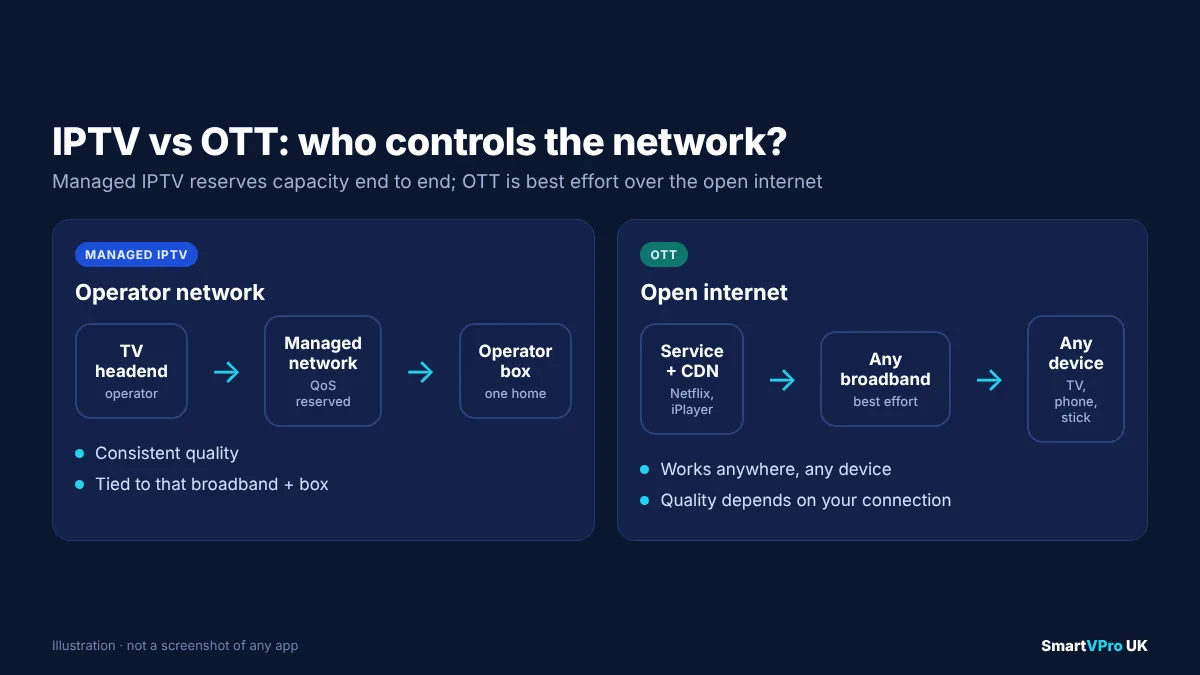
“IPTV” and “OTT” are two of the most confusing terms in UK television, partly because industry engineers and everyday viewers use them differently. An engineer will tell you that IPTV runs on a closed, managed network and OTT runs over the public internet. A viewer shopping for an “IPTV subscription” is usually looking for live channels delivered to a Fire TV Stick or smart TV app, which runs over the public internet.
This guide explains both meanings, compares IPTV and OTT across cost, quality, devices and reliability, shows where well-known UK services fit, and helps you decide what actually matters when you choose a TV service.
Table of Contents
What is IPTV?
IPTV stands for Internet Protocol Television: television delivered using the same IP technology that carries web pages and email, rather than through an aerial, satellite dish or traditional cable signal.
The International Telecommunication Union, the UN agency that sets telecoms standards, has long defined IPTV through its standardisation work as multimedia services, such as television, delivered over IP networks that are managed to provide the required quality of service, security, interactivity and reliability. That work is coordinated through the ITU’s IPTV Joint Coordination Activity. The key word is *managed*. In the strict sense, IPTV is run by an operator that controls the network all the way to your home, so it can reserve capacity for TV and keep the picture stable even when the rest of your connection is busy.
Classic examples are telecoms operators that deliver TV over their own broadband infrastructure to their own set-top boxes. In the UK, BT TV historically delivered some channels over BT’s own network to its YouView boxes, rather than as a normal internet stream.
How managed IPTV delivers channels
Managed IPTV often uses multicast. Instead of sending a separate copy of BBC One to every home that is watching, the operator sends one stream across its network and lets each home “join” it, much like tuning a traditional TV channel. This is efficient for live TV, because the operator’s network carries the same amount of traffic whether a hundred or a hundred thousand people are watching.
Because the operator controls the route, it can also prioritise TV traffic over other data. That is why managed IPTV is usually very consistent, but it only works with that operator’s broadband and that operator’s equipment.
What “IPTV” means to most UK viewers
Outside the industry, “IPTV” has taken on a broader meaning. When people in the UK talk about an “IPTV subscription”, they usually mean:
- A service that provides live TV channels, often with films and series on demand.
- Delivered over ordinary home broadband, from any internet provider.
- Watched through an app such as IPTV Smarters Pro, TiviMate or a smart TV player, using login details such as an Xtream Codes login or an M3U playlist.
Technically, this is closer to OTT, because the streams travel over the open internet and your broadband provider does not manage them. The word “IPTV” stuck because these services imitate traditional TV: live channels, a programme guide and channel numbers. If you are new to the login formats involved, our Xtream Codes vs M3U guide explains them, and our UK IPTV service explainer covers what these services typically include.
What is OTT?
OTT stands for “over-the-top”. The name describes content that travels “over the top” of an internet connection supplied by someone else. Your broadband provider carries the data but does not control, package or manage the service. Wikipedia’s overview of OTT media services describes them as services offered directly to viewers via the internet, bypassing cable, broadcast and satellite platforms.
Familiar OTT services in the UK include:
- Subscription video on demand (SVOD): Netflix, Disney+, Amazon Prime Video, Apple TV+.
- Broadcaster streaming services: BBC iPlayer, ITVX, Channel 4’s streaming service and My5.
- Free ad-supported streaming TV (FAST): channels such as Pluto TV or Samsung TV Plus, which look like traditional linear channels but are streamed over the internet.
- Live sport streaming: services such as DAZN, and the streaming apps attached to UK pay-TV sports channels.
How OTT delivers video
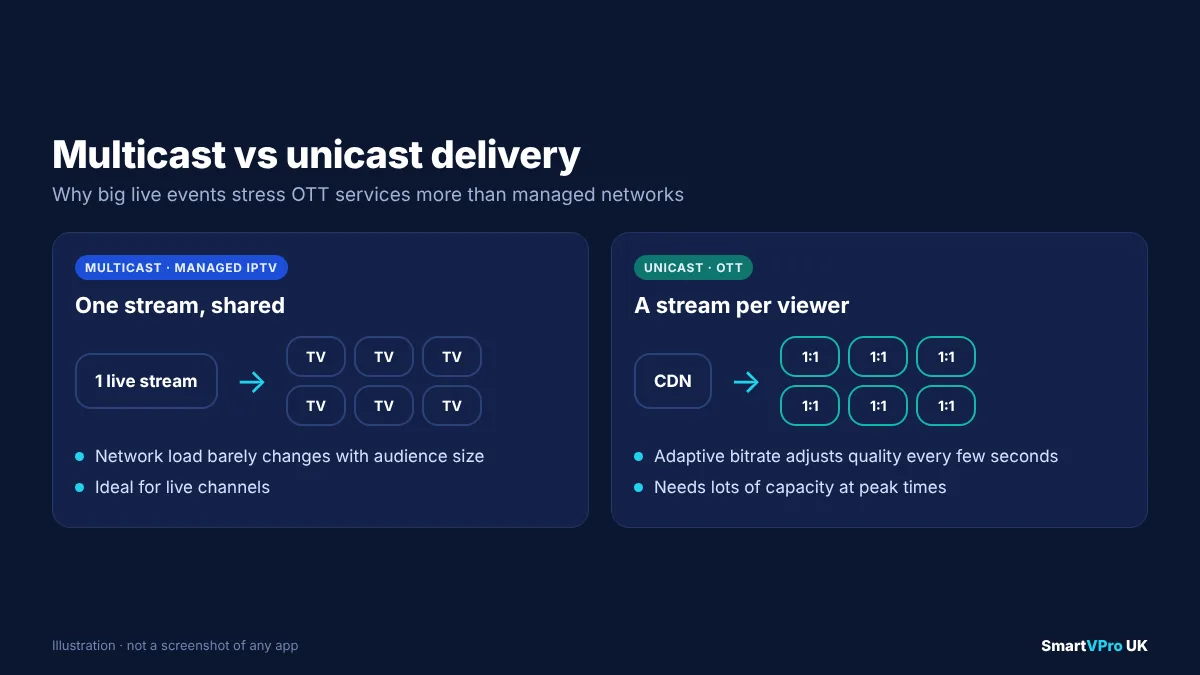
OTT services usually send each viewer their own stream (unicast) from a content delivery network (CDN), a network of servers placed close to large populations so that video does not have to travel far. The stream uses adaptive bitrate technology: the video is prepared at several quality levels, and your app switches between them every few seconds depending on how fast your connection is at that moment.
That is why Netflix might briefly look soft when you start a film and then sharpen up. It is also why OTT works on almost any connection and any device, from a phone on 4G to a 4K TV on full-fibre broadband. The trade-off is that the service cannot guarantee quality, because it does not control the network between the CDN and your home. Your Wi-Fi, your broadband provider’s congestion and the time of day all play a part.
IPTV vs OTT: the key differences
The table below compares the two in the strict, technical sense, then notes where everyday “IPTV subscriptions” usually sit.
| Managed IPTV (strict sense) | OTT | Typical “IPTV subscription” in the UK | |
|---|---|---|---|
| Network | Operator’s own managed network | Open internet | Open internet |
| Who controls quality | The operator, end to end | Nobody end to end; best effort | Nobody end to end; best effort |
| Broadband provider | Must be the TV operator’s | Any | Any |
| Devices | Operator’s set-top box | Phones, tablets, smart TVs, sticks, consoles, browsers | Fire TV Stick, Android TV, smart TVs, phones, IPTV boxes |
| Delivery method | Often multicast for live TV | Unicast from CDNs, adaptive bitrate | Usually unicast from the provider’s servers |
| Content model | Linear channels plus on demand | Mostly on demand, increasingly live | Mostly linear channels plus on demand |
| Contract | Usually tied to a broadband contract | Usually monthly, cancel any time | Usually prepaid for a fixed period |
| Strengths | Consistent quality, TV-like experience | Flexibility, any device, anywhere | Familiar channel guide on any device |
| Weaknesses | Locked to one provider and box | Quality depends on your connection | Quality depends on provider servers and your connection |
Network and quality control
This is the defining difference. Managed IPTV can reserve bandwidth for TV, so a live football match looks the same at 3pm on Saturday as it does at 3am. OTT is “best effort”: it adapts to whatever capacity is available. With a good full-fibre connection, the gap is often invisible. On a busy Wi-Fi network in a crowded block of flats, it can be very visible.
Devices and flexibility
OTT wins on flexibility. Because it runs over the open internet, the same account usually works on a phone, tablet, laptop, smart TV and streaming stick, at home or away. Managed IPTV generally only works on the operator’s own box at the address where the broadband is installed.
Latency for live sport
Latency is the delay between something happening and you seeing it. Traditional broadcast and managed IPTV tend to be a few seconds behind real life. OTT streams are often further behind, because the video is chopped into segments and buffered to allow adaptive bitrate switching. If your neighbour cheers a goal before you see it, latency is the reason. Some apps let you reduce the buffer size, which cuts the delay at the cost of more buffering on a weak connection.
Cost
Managed IPTV is usually bundled with broadband and a minimum-term contract. OTT services are typically monthly subscriptions you can cancel at any time, which is why many households now combine free-to-air TV, one or two OTT services and occasional sports passes. For a full UK price comparison, see our IPTV vs pay TV comparison and our guide to IPTV costs in the UK.
Where do well-known UK TV services fit?
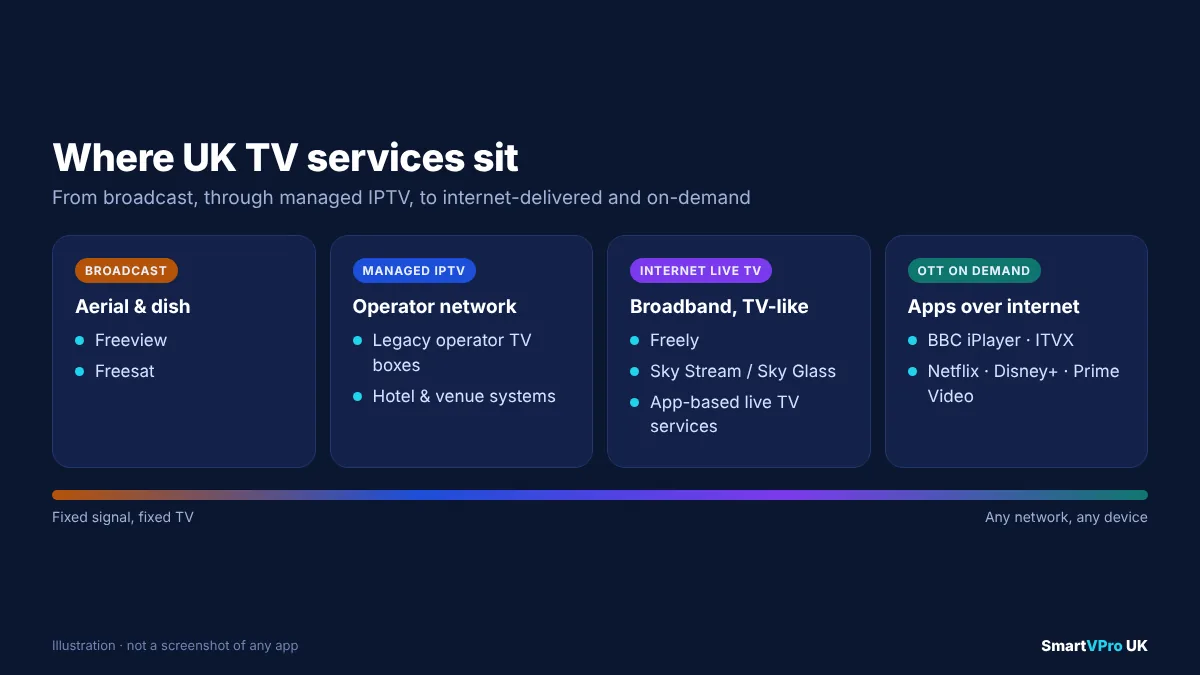
The lines have blurred in recent years as UK broadcasters and pay-TV companies have moved from dishes and aerials to broadband.
- Freeview and Freesat are traditional broadcast platforms, using an aerial or satellite dish. Many Freeview-connected TVs add on-demand apps over broadband.
- Freely, launched in 2024 by Everyone TV (the company behind Freeview and Freesat), delivers live channels from UK public service broadcasters over the internet on compatible smart TVs, without an aerial, as TechRadar explains. It behaves like traditional TV but is delivered over the open internet, so technically it is an OTT-delivered live TV platform.
- Sky Stream and Sky Glass deliver Sky’s channels over broadband instead of a satellite dish. ISPreview’s report on the Sky Stream puck’s launch notes that it does not need a dish. These are internet-delivered pay-TV services that look like a traditional set-top box experience.
- BBC iPlayer, ITVX, Netflix, Disney+ and Prime Video are classic OTT services.
- App-based “IPTV subscriptions” deliver live channel line-ups to IPTV player apps over ordinary broadband. Technically they are OTT-style delivery with a traditional channel-guide interface.
The takeaway is that the label matters less than the practical questions: which network carries the stream, what devices it works on, who supports you when it goes wrong, and whether the content is properly licensed.
Is a Fire TV Stick an IPTV or an OTT device?
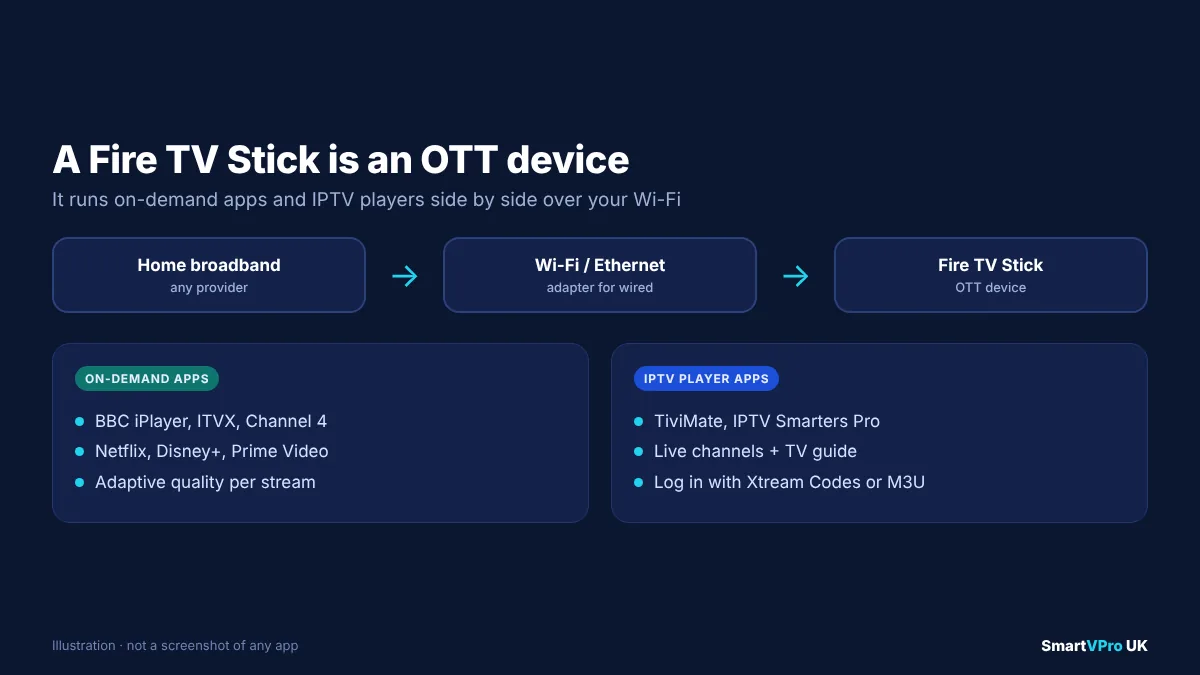
A Fire TV Stick is an OTT device. It connects to the internet over your Wi-Fi and runs streaming apps, from Netflix and BBC iPlayer to IPTV players such as TiviMate or IPTV Smarters Pro. It does not connect to a managed operator network.
When you install an IPTV player on a Fire TV Stick and log in to a live-TV subscription, you are watching an “IPTV service” in the everyday sense, delivered over the open internet, in the technical sense, on an OTT device. The same applies to Android TV and Google TV boxes, Roku devices, Apple TV, smart TVs and dedicated IPTV boxes such as Formuler and BuzzTV. If you want to set one up, see our guides to the Fire TV Stick, Android TV, Samsung and LG smart TVs, Apple TV and Formuler and BuzzTV boxes.
Which is better, IPTV or OTT?
Neither is better in every case. Each suits different households.
Managed IPTV suits you if
- You want the most consistent picture possible, especially for live sport.
- You are happy to take TV and broadband from the same company on a contract.
- You mainly watch on one or two main TVs at home.
OTT suits you if
- You want to watch on phones, tablets and laptops as well as the TV.
- You want short or no contracts and the freedom to switch services.
- You mainly watch on demand, with live TV as an extra.
An app-based live TV service suits you if
- You want a traditional channel guide with live channels on any device.
- You are comfortable installing an app and entering login details.
- Your home broadband is reasonably fast and stable, ideally with Ethernet for the main TV.
Whichever route you take, check the provider’s support, refund policy and content rights before paying.
How to get the best picture quality from internet TV
Because both OTT and app-based IPTV run over the open internet, the same habits improve quality:
- Check your real speed at peak time. Netflix recommends at least 15 Mbps for 4K, 5 Mbps for Full HD and 3 Mbps for HD per stream. Test in the evening, when your connection is busiest, not first thing in the morning. Our internet speed for IPTV guide explains how much headroom you need for several TVs.
- Use Ethernet for the main TV. A cable from the router removes most Wi-Fi drop-outs. Powerline adapters or mesh Wi-Fi are good alternatives if a cable is impractical.
- Place your router well. Keep it in the open, off the floor and away from thick walls, mirrors and microwaves.
- Limit competing traffic. Large game downloads, cloud backups and video calls all compete with your stream.
- Keep apps and devices updated. Updates often improve streaming performance.
- Restart now and then. Streaming sticks and boxes are small computers; a weekly restart keeps them responsive.
If you still get buffering, our IPTV buffering guide covers DNS changes, router settings and app options in more detail.
Catch-up, on demand and recording: how each model handles them
The way a service delivers video also shapes the extras you get around live TV.
- Managed IPTV operators often record popular channels on their own network, so you can restart a programme already in progress or watch catch-up for several days. Because the operator controls the system, these features usually work the same way on every box.
- OTT broadcaster apps such as BBC iPlayer and ITVX provide catch-up as on-demand titles. Rather than “rewinding the channel”, you pick the programme from a list. Availability windows depend on the rights the broadcaster holds for each show.
- OTT subscription services such as Netflix and Disney+ are on demand by design, so there is no live channel to catch up on, except for occasional live events.
- App-based live TV services may offer catch-up on some channels, often shown as a small icon in the TV guide. It depends on the provider’s servers storing recent programmes. Our EPG guide explains how catch-up and timeshift appear in common player apps.
Local recording is a separate question. Some set-top boxes and apps can record to USB storage, while most OTT apps do not allow recording at all and offer downloads for offline viewing instead. If recording matters to you, check exactly how a service supports it before you sign up, rather than assuming it works like a traditional PVR.
IPTV vs OTT for live sport
Live sport is where the differences between delivery methods are most noticeable, because millions of people watch the same moment at the same time.
- Peak demand. A managed IPTV network using multicast carries one copy of each live channel, so a big match barely changes the load. OTT services must send a separate stream to every viewer, which is why streaming platforms invest heavily in CDN capacity for major events, and why smaller services can struggle at 3pm on a Saturday.
- Delay. Internet streams are often further behind real life than broadcast. If you follow a match on a phone app or social media at the same time, you may see goals there first. Turning off score notifications during a match is the simplest fix.
- Frame rate. UK sport is usually produced at 50 frames per second. A stream that has been converted to a lower frame rate looks less smooth in fast action. On devices that support it, turning on a “match frame rate” setting helps.
- Your home network. On match day, everyone in the house tends to be online. A wired connection for the main TV makes more difference during sport than at any other time.
If you mainly subscribe for football, test any service during a busy weekend fixture before paying for a long plan.
IPTV and OTT outside the home: hotels, offices and venues
The strict, managed form of IPTV is still very common in businesses. Hotels, hospitals, cruise ships, stadiums and large offices often run their own IPTV systems over a private network, delivering a set of channels to every room or screen from one central system. This is managed IPTV in the textbook sense: the operator owns the network, controls the channel line-up and guarantees quality inside the building.
OTT plays a different role in these settings. Guests increasingly sign in to their own Netflix or iPlayer accounts on hotel TVs, and some venues stream live content to visitors’ phones. For homes, though, the practical choice is almost always between broadcast TV, OTT apps and app-based live TV services delivered over ordinary broadband.
A quick checklist before choosing any internet TV service
Whether a service calls itself IPTV, OTT or something else, these questions tell you far more than the label:
- Does it work on every device I use? Check your TV, streaming stick, phone and tablet specifically.
- What happens at peak times? Ask about, or test, busy evenings and weekend sport.
- How many screens can watch at once? Check the connection limit against the number of TVs in your home.
- Is there a TV guide and catch-up? A working EPG makes live TV far easier to use.
- How does support work? Look for a real contact route and response times.
- What are the terms? Check contract length, renewal and refund policy.
- Does the provider have the rights to the content? Ask directly, and be cautious of anything that sounds too good to be true.
The technology behind both: a short glossary
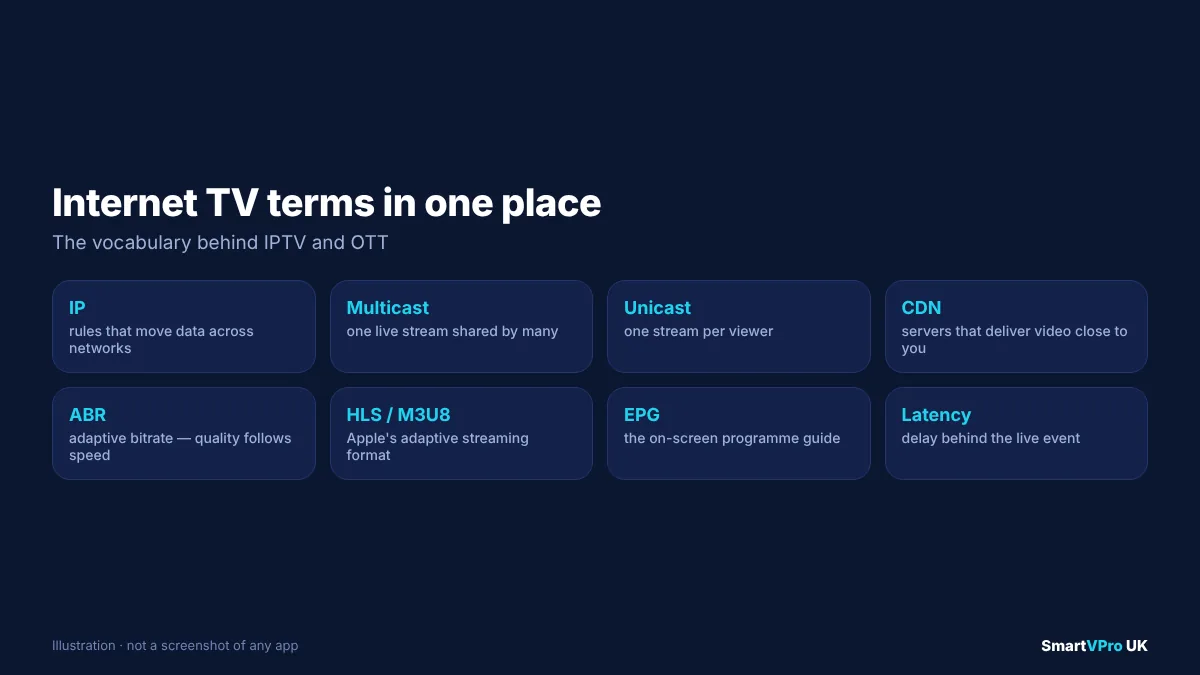
- IP (Internet Protocol): the basic set of rules that moves data across networks, including the internet.
- Managed network: a network where one operator controls capacity and prioritisation end to end.
- Multicast: sending one live stream that many viewers share across a managed network.
- Unicast: sending each viewer their own copy of a stream, typical of OTT.
- CDN (content delivery network): distributed servers that store and deliver video close to viewers.
- Adaptive bitrate (ABR): switching between quality levels during playback to match your connection.
- HLS: HTTP Live Streaming, an adaptive streaming format specified in RFC 8216. Its playlists use the M3U8 format.
- EPG (electronic programme guide): the on-screen TV guide. Our EPG guide explains how it works in IPTV apps.
- Latency: the delay between the live event and the moment you see it.
- Linear TV: scheduled channels, as opposed to on-demand viewing.
Common myths about IPTV and OTT
Myth 1: “IPTV is always illegal.” IPTV is a delivery technology used by major telecoms operators worldwide. Legality depends on whether a particular service has the rights to the content it distributes. Our guide to IPTV and the law in the UK explains what to check, including the Copyright, Designs and Patents Act 1988.
Myth 2: “OTT always looks worse than satellite.” On a fast, stable connection, 4K HDR OTT streams can look excellent. Problems usually come from Wi-Fi, congestion or an overloaded provider, not from OTT itself.
Myth 3: “You need a special box for IPTV.” In the everyday sense, you do not. Most smart TVs, streaming sticks and phones can run IPTV player apps. Dedicated boxes add convenience, Ethernet ports and IPTV-focused remotes, but they are optional.
Myth 4: “A VPN makes streaming faster.” A VPN adds an extra step, so it usually makes streaming slightly slower. It can help in specific cases, such as when a broadband provider throttles certain traffic. Our IPTV VPN guide explains when it is worth using one.
Where internet TV is heading in the UK
The direction is clear even if the labels remain messy. UK broadcasters, pay-TV operators and new platforms are all moving live TV onto broadband: Freely for public service channels, Sky Stream and Sky Glass for Sky, and broadcaster apps such as BBC iPlayer and ITVX for live and on-demand viewing. As more homes move to full-fibre broadband, the quality gap between managed and open-internet delivery keeps shrinking.
For viewers, that means the questions worth asking are practical ones: does the service work on my devices, does it hold up during the busiest matches of the week, is support responsive, and does the provider have the rights to what it offers?
Try internet TV on your own setup
The simplest way to judge any internet TV service is to test it on your own broadband, at the times you normally watch. SmartVPro offers a 24-hour trial that works in common IPTV player apps on Fire TV Stick, Android TV, smart TVs, Apple TV and dedicated boxes, and you can compare the available plans afterwards. Whatever you choose, our guide to choosing a UK IPTV provider lists the checks worth making first.
Frequently asked questions
What is the difference between IPTV and OTT?
In the strict technical sense, IPTV is TV delivered over a managed network controlled by an operator, which can guarantee quality. OTT is video delivered over the open internet to any device, such as Netflix or BBC iPlayer, without the broadband provider managing the stream.
Is OTT better than IPTV?
Neither is better in every case. Managed IPTV gives the most consistent picture but ties you to one operator and box. OTT works on any device and connection, but quality depends on your broadband and Wi-Fi.
Is a Firestick an OTT device?
Yes. A Fire TV Stick connects over the open internet and runs streaming apps. It can run on-demand apps such as Netflix and BBC iPlayer as well as IPTV player apps for live-TV subscriptions.
Is Netflix IPTV or OTT?
Netflix is an OTT service. It streams over the open internet to phones, tablets, smart TVs and streaming devices, and adapts the picture quality to your connection.
Is Sky Stream IPTV or OTT?
Sky Stream delivers Sky’s channels over broadband instead of a satellite dish, and works with broadband from other providers. It looks like a traditional set-top box service but uses internet delivery rather than satellite.
What internet speed do I need for IPTV or OTT in 4K?
Netflix recommends a steady connection of at least 15 Mbps for 4K. For several TVs at once, multiply by the number of streams and leave headroom for other devices.
Why are live streams behind real life?
Internet streams are split into short segments and buffered so the app can adjust quality smoothly. That adds a delay, often longer than traditional broadcast. Some apps let you reduce the buffer at the cost of more buffering on weak connections.
Is IPTV legal in the UK?
IPTV is a legal technology used by major operators. Whether a particular service is legal depends on whether it has the rights to the channels and content it distributes.
Sources and further reading
- IPTV Joint Coordination Activity: terms of reference, International Telecommunication Union.
- Over-the-top media service, Wikipedia.
- What is Freely?, TechRadar.
- Sky UK unveil broadband-based Stream TV box without satellite, ISPreview.
- RFC 8216: HTTP Live Streaming, IETF.
- Internet connection speed recommendations, Netflix Help Centre.
Get the next IPTV guide by email
New setup guides, app comparisons and buffering fixes for UK viewers – about two emails a month, no spam, unsubscribe in one click.