
Quick answer: Xtream Codes, M3U and Stalker Portal are three different ways an IPTV app logs in to a provider. Xtream Codes uses a server URL, a username and a password, and loads live TV, films, series and the TV guide automatically. M3U is a playlist link (or file) that lists every channel; it is the most widely supported format but usually needs a separate EPG link. Stalker Portal (also called a MAC portal) logs in with a portal URL and the device’s MAC address, and is used mainly by MAG and Formuler boxes. For most UK viewers on a Fire TV Stick, Android TV or phone, Xtream Codes is the easiest and most reliable choice.

If you have just bought an IPTV subscription, the welcome email can look confusing. It may contain a long web address ending in get.php, a “host”, a username and password, or a portal URL with an instruction to send your MAC address. These are not three different services. They are three different doors into the same service, and the one you should use depends on the app and device in front of you.
This guide explains what Xtream Codes actually is (including the 2019 shutdown that still causes confusion), how it compares with M3U playlists and Stalker portals, which apps support which format, and how to fix the login errors UK users run into most often.
Table of Contents
What is Xtream Codes?
Xtream Codes began life as a commercial piece of server software. It was a control panel and streaming engine that IPTV operators installed on their servers to manage channels, user accounts, subscriptions and connections. The software exposed an application programming interface (API), a set of web addresses that apps could call to ask questions such as “is this login valid?”, “which channel categories exist?” and “what is on BBC One at 9pm?”.
Player apps such as IPTV Smarters Pro, TiviMate and XCIPTV were built to talk to that API. Because so many operators used the panel, “Xtream Codes” became the shorthand for that style of login: a server address, a username and a password.
Today, the phrase almost never refers to the original company. It refers to the Xtream Codes API format, which modern IPTV panels still copy so that existing apps keep working. When an app’s login screen offers “Login with Xtream Codes API”, it simply means “enter the server URL, username and password your provider gave you”.
What happened to Xtream Codes in 2019?
On 18 September 2019, Italy’s Guardia di Finanza (financial police), working with Europol and Eurojust, shut down the original Xtream Codes platform as part of a wider operation against unlicensed pay-TV streaming. Searches took place in several countries, including Greece, Bulgaria, Germany, France and the Netherlands, according to reporting by ANSA and Il Post. The investigation centred on how the software was being used by unauthorised resellers.
Two practical consequences remain in 2026:
- The original software is gone. Nobody is “running Xtream Codes” in the sense of the old company. Providers use other panels that reproduce the same API.
- The login format survived. Apps kept the “Xtream Codes” label because users recognise it. That is why you still see the name everywhere.
An important point follows from this: a login format tells you nothing about whether a service is licensed. Xtream-style logins, M3U playlists and portals are neutral technologies, just as an MP4 file is a neutral container. Whether the channels behind a login are properly licensed is a separate question, which we cover in our guide to IPTV and the law in the UK.
What does an Xtream Codes login look like?
A typical set of Xtream Codes details looks like this (the values below are made-up examples):
Server URL:  http://line.example-provider.com:8080
Username:    jsmith2026
Password:    k7Qx92Lm
Some apps also ask for a “playlist name” or “any name”. That field is only a label for you, so type something like “Living room” or “Main TV”.
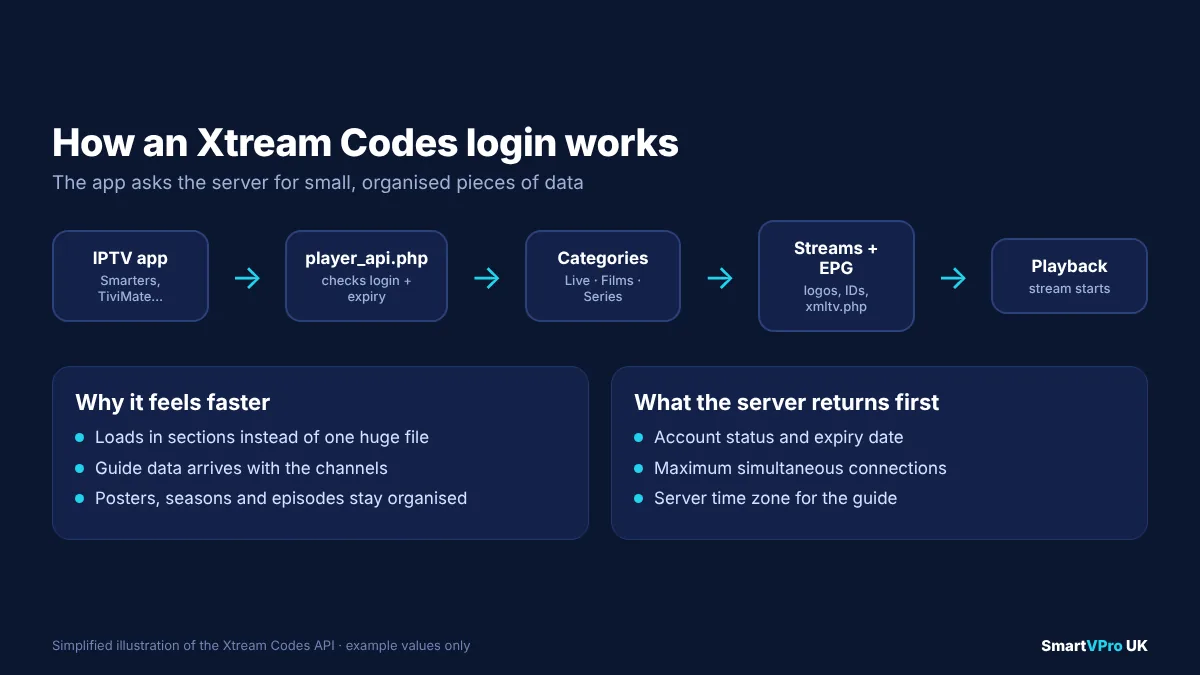
How the Xtream Codes API works
When you press “Add user” or “Log in”, the app does not download one huge file. Instead, it makes a series of small requests to the provider’s server. In simplified terms:
- Authentication. The app sends your username and password to the server’s
player_api.phpendpoint. The server replies with your account status, expiry date and the maximum number of simultaneous connections your plan allows. - Categories. The app asks for live TV categories (for example “UK Entertainment”, “UK Sport”, “Kids”), then film and series categories.
- Streams. For each category, the app requests the list of channels or titles. Logos, names and stream IDs come back in a structured format (JSON).
- Guide data. The app requests the electronic programme guide, usually through an
xmltv.phpaddress on the same server, or through “short EPG” requests for the channel you are viewing. - Playback. When you choose a channel, the app builds the stream address from the server URL, your credentials and the stream ID, and starts playing it.
Because the information arrives in separate, organised pieces, Xtream logins tend to load faster, show films and series in proper sections with posters, and display the TV guide without extra setup. That is the main reason most UK providers, SmartVPro included, recommend Xtream Codes as the first choice on supported apps.
What is an M3U playlist?
M3U is a plain-text playlist format that dates back to desktop music players in the 1990s. The name comes from “MP3 URL”. An M3U file is simply a list: each entry has a line of information about the item, followed by the address where the item can be played. The extended version, which starts with the line #EXTM3U, is described in detail on Wikipedia’s M3U page, and the closely related M3U8 format is used by Apple’s HTTP Live Streaming standard, documented in RFC 8216.
In IPTV, an M3U playlist is a list of every live channel (and sometimes every film and episode) in your subscription. Your provider usually gives you an M3U URL, a web address that generates the playlist for your account when an app opens it.
What an M3U URL looks like
Many providers build their M3U link from the same details as the Xtream login. A typical (example) link looks like this:
http://line.example-provider.com:8080/get.php?username=jsmith2026&password=k7Qx92Lm&type=m3u_plus&output=tsNotice that the server, username and password are all inside the link. If you ever need to convert an M3U link into an Xtream Codes login, you can usually read the three values straight out of it: everything before /get.php is the server URL, the value after username= is the username, and the value after password= is the password. The type=m3u_plus part asks for a playlist that includes extra details such as logos and group names, and output=ts (or output=m3u8) chooses the stream format.
What is inside an M3U file?
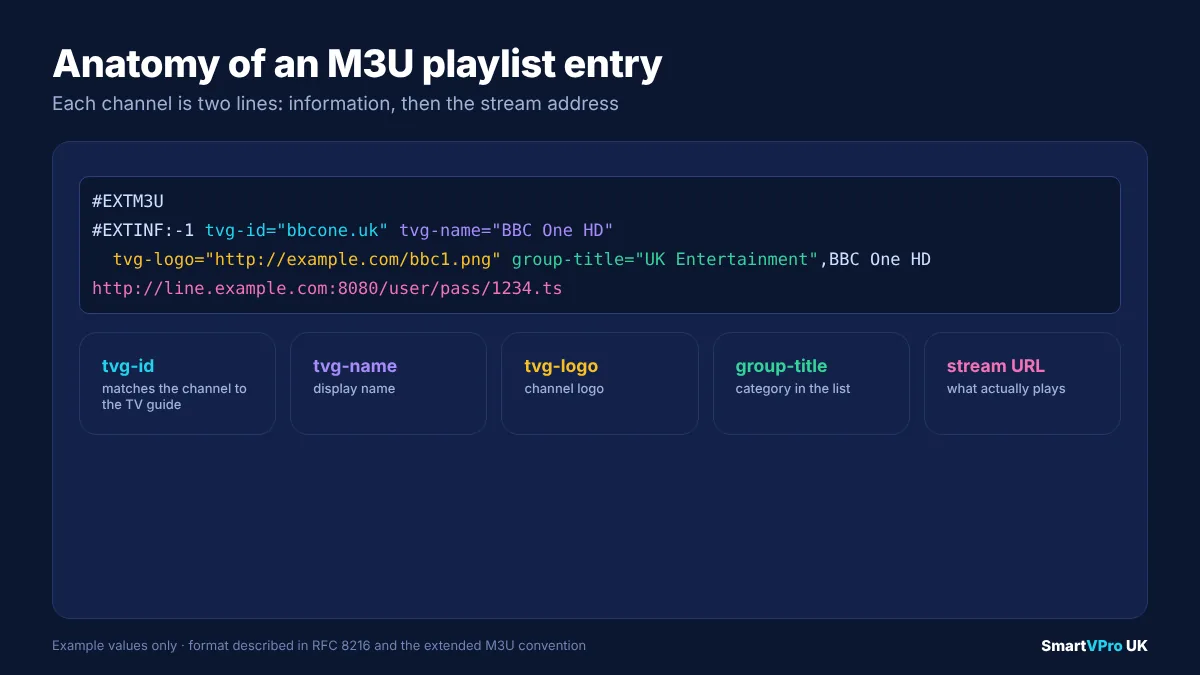
If you opened an IPTV M3U playlist in a text editor, a single channel would look roughly like this:
#EXTM3U
#EXTINF:-1 tvg-id="bbcone.uk" tvg-name="BBC One HD" tvg-logo="http://example.com/logos/bbc1.png" group-title="UK Entertainment",BBC One HD
http://line.example-provider.com:8080/jsmith2026/k7Qx92Lm/1234.ts
Each part has a job:
#EXTM3Utells the app that this is an extended M3U playlist.#EXTINF:-1starts a channel entry. The-1means the duration is unknown, which is normal for live TV.tvg-idis the channel’s guide identifier. The app uses it to match the channel to the right programme listings in the EPG file. If this value is wrong or missing, the channel plays but the guide stays blank.tvg-nameandtvg-logoprovide the display name and logo.group-titlesets the category the channel appears under.- The final line is the stream address itself.
This simple structure is why M3U is supported almost everywhere. Its weakness is size. A full IPTV playlist can contain tens of thousands of lines, and some apps, particularly on older smart TVs, struggle to load or refresh very large files.
Why M3U usually needs a separate EPG link
An M3U playlist contains the channels but not the programme schedule. The schedule lives in a separate file in XMLTV format, which your provider supplies as an EPG URL. On many panels it follows the same pattern as the M3U link, for example:
http://line.example-provider.com:8080/xmltv.php?username=jsmith2026&password=k7Qx92LmIf you load an M3U playlist and your TV guide is empty, the most common fix is to paste this EPG link into the app’s guide settings. Our IPTV EPG guide walks through this app by app, including how to fix guides that are an hour out because of time-zone settings.
What is a Stalker Portal (MAC portal)?
A Stalker Portal is a third login method, named after the Stalker middleware originally developed for Infomir’s MAG set-top boxes. Instead of a username and password, the portal identifies your device by its MAC address, a hardware identifier that looks like 00:1A:79:XX:XX:XX. MAG boxes have MAC addresses starting with 00:1A:79, and many portal-based services expect that prefix.
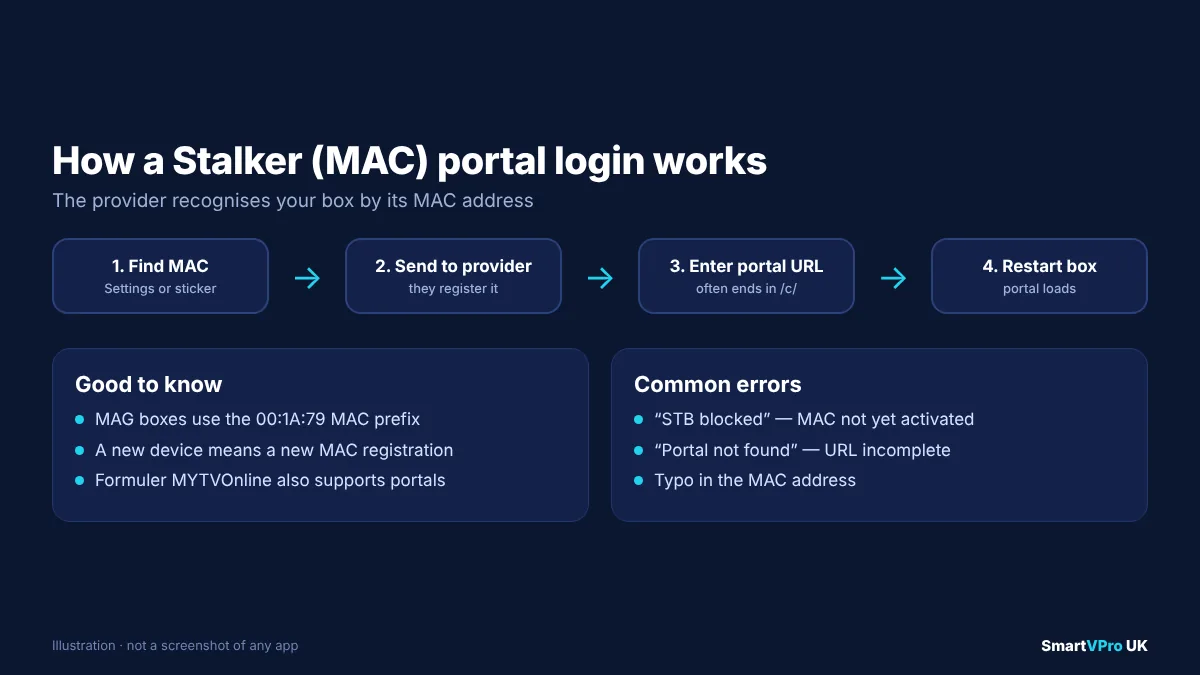
The process usually works like this:
- You find your device’s MAC address in its settings (on a MAG box, it is also printed on a sticker underneath).
- You send the MAC address to your provider, who registers it on their portal.
- The provider sends you a portal URL, which often ends in
/c/, for examplehttp://portal.example-provider.com:8080/c/. - You enter the portal URL in the device’s portal settings, restart, and the provider’s interface loads.
Stalker portals are still common on MAG boxes and on Formuler devices through the MYTVOnline app. They can feel very much like a traditional cable box, with a fast channel list and a built-in guide. The trade-offs are that the login is tied to one device, changing devices means asking your provider to update the MAC address, and far fewer apps support portals than support Xtream Codes or M3U. If you use a Formuler or BuzzTV box, our Formuler and BuzzTV IPTV setup guide covers the portal method step by step.
Xtream Codes vs M3U vs Stalker Portal: side-by-side comparison
The table below summarises the practical differences UK viewers notice day to day.
| Feature | Xtream Codes API | M3U playlist | Stalker / MAC portal |
|---|---|---|---|
| What you enter | Server URL, username, password | One playlist URL (or a file) | Portal URL; provider registers your MAC |
| App support | Very wide (Smarters, TiviMate, XCIPTV, IBO, IPTVX and more) | Widest of all, including VLC | Limited (MAG, Formuler MYTVOnline, some Android apps) |
| TV guide (EPG) | Usually automatic | Usually needs a separate XMLTV link | Built in |
| Films and series | Organised with posters and seasons | Often a long flat list, or missing | Organised in the portal’s own menus |
| Loading speed | Fast; loads in sections | Slower on large playlists | Fast once registered |
| Changing devices | Log in on the new device | Paste the link on the new device | Provider must update the MAC address |
| Catch-up support | Common, if the provider offers it | Depends on app and playlist tags | Common, if the provider offers it |
| Best for | Fire TV Stick, Android TV, phones, Apple TV | VLC, older smart TV apps, quick tests | MAG boxes, Formuler, cable-box feel |
Which login type should you use?
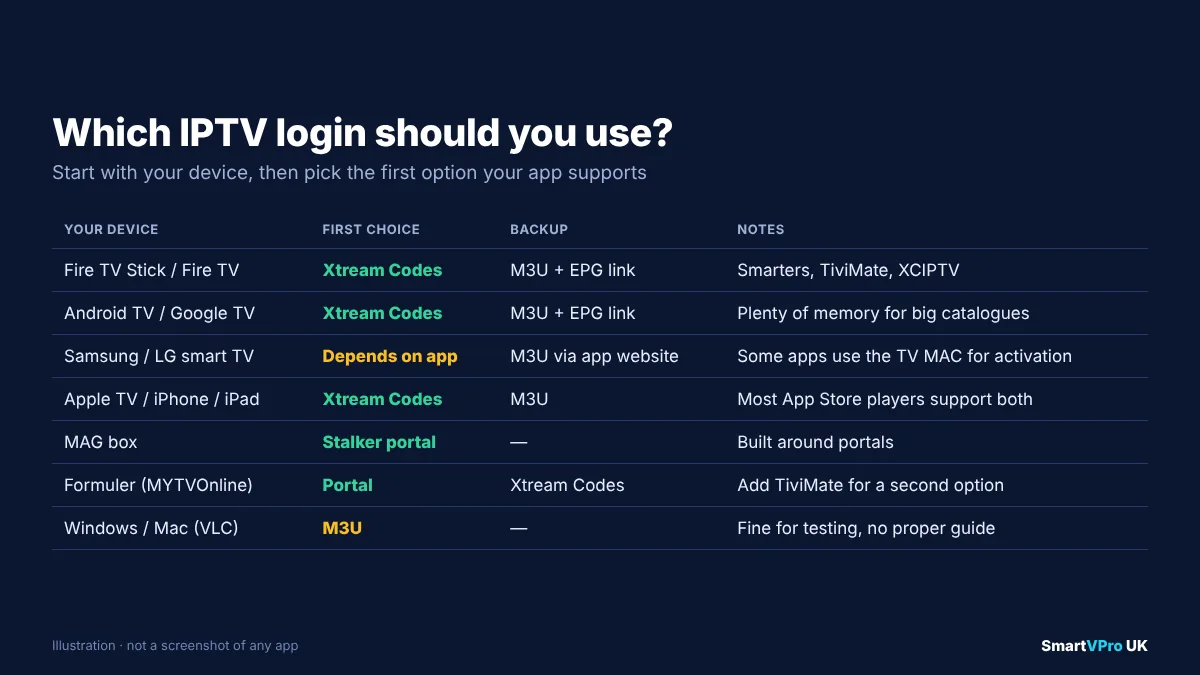
For most people the answer is simple: use Xtream Codes if your app supports it, M3U if it does not, and a portal only if your device is built around one. Here is how that plays out on the devices UK households use most.
Amazon Fire TV Stick and Fire TV
Use Xtream Codes. Apps such as IPTV Smarters Pro, TiviMate and XCIPTV all have an Xtream login option, and it gives you the guide, films and series in separate, well-organised sections. M3U also works if you prefer it, but you will need to add the EPG link. Our Firestick IPTV setup guide covers installation, and the TiviMate guide explains TiviMate’s own “Xtream Codes” playlist option.
Android TV, Google TV and Android boxes
Again, Xtream Codes first. The same apps are available, and most Android boxes have enough memory to handle large catalogues comfortably. See our Android TV IPTV setup guide.
Samsung and LG smart TVs
This depends on the app. Some smart TV players, including IPTV Smarters Pro on Samsung’s app store, accept Xtream logins directly. Others, such as several apps that are activated through their developer’s website using your TV’s MAC address, ask you to upload an M3U link there instead. Do not confuse that kind of app activation with a Stalker portal: the app uses the TV’s MAC address to identify your installation on the developer’s site, but the content still comes from your M3U or Xtream details. Our Samsung and LG smart TV IPTV guide covers each app.
Apple TV, iPhone and iPad
Most App Store IPTV players support both Xtream Codes and M3U. For example, IPTVX’s App Store listing lists Xtream API and M3U/M3U8 playlists and custom EPG URLs. Xtream is usually the smoother option. Our Apple TV IPTV setup guide has the details.
MAG and Formuler boxes
MAG boxes are built around Stalker portals, so the portal method is normal there. Formuler devices running MYTVOnline can use portals and, depending on the app version and provider, Xtream logins as well. If your provider supports both, try the portal first for the most “native” experience, then switch to Xtream if you want an app such as TiviMate.
Windows PC, Mac and VLC
M3U is the universal option here. VLC media player can open an M3U link directly (Media, then Open Network Stream). It is handy for a quick test, but VLC does not provide a proper TV guide, so a dedicated IPTV app is better for regular viewing.
How to add each login type: step by step
The menus vary between apps, but the logic is the same everywhere.
Adding an Xtream Codes login (IPTV Smarters Pro example)
- Open IPTV Smarters Pro and choose Add user (or the “+” icon).
- Select Login with Xtream Codes API.
- Enter any name, then the username, password and server URL exactly as your provider sent them, including
http://and the port number (for example:8080). - Select Add user. The app downloads live channels, films and series, then opens the main menu.
- Open Live TV, then the TV guide view, to confirm programme listings are showing.
For more on this app, including settings that reduce buffering, see our IPTV Smarters Pro guide.
Adding an M3U playlist (TiviMate example)
- Open TiviMate and choose Add playlist.
- Select M3U playlist, then enter the full M3U URL from your welcome email. Copying it from your phone with a remote keyboard app saves a lot of typing.
- Press Next. TiviMate reads the playlist and shows how many channels it found.
- When asked for an EPG source, paste the provider’s XMLTV EPG URL.
- Choose which channel groups to show, then finish. Allow a minute or two for the guide to load the first time.
Adding a Stalker Portal (MAG box example)
- Note the MAC address from the sticker underneath the box, or from Settings > Device info.
- Send it to your provider and wait for confirmation that it has been activated.
- Go to Settings > Servers > Portals (wording varies by firmware).
- Enter a portal name and the portal URL your provider supplied, ending in
/c/if they included it. - Save, then restart the box. The provider’s portal interface should load automatically.
Common errors and how to fix them
Almost every login problem comes down to a typo, an expired account, a network block or a mismatch between the format and the app. Work through the list below in order.
“Invalid username or password” or “Authorisation failed”
- Check for capital letters. Usernames and passwords are case-sensitive.
- Look for characters that are easy to confuse:
0andO,land1,Iandl. - Make sure there are no spaces before or after any value, which commonly happens when copying from an email on a phone.
- Confirm your subscription or trial has not expired. Many apps show the expiry date under account information.
“Server URL invalid” or “Unable to connect”
- Include
http://at the start and the port number at the end if your provider supplied one (for example:8080or:80). - Do not add
/get.phpor/c/to an Xtream login. Those belong to M3U links and portals respectively. - Try the same login on a phone using mobile data. If it works there but not at home, something on your home network or broadband is blocking the connection. Some UK broadband providers apply court-ordered blocks to particular servers, which can stop some streams working.
Channels load but the TV guide is empty
- On an M3U login, add the provider’s XMLTV EPG link in the app’s guide settings.
- On an Xtream login, force a guide refresh in the app’s settings and wait a few minutes.
- If the times are an hour wrong, set your device’s time zone to London and the app’s EPG time shift to zero. The EPG fixes guide covers each app.
Films and series are missing
Some apps only import live channels from an M3U playlist. Switch to an Xtream Codes login in the same app, or check that you used the m3u_plus version of the link if your provider offers both.
“Maximum connections reached”
Your plan allows a set number of streams at once. Close the app on another TV, phone or tablet, or wait a few minutes for the server to release the old connection. If you regularly watch on several screens, look at a multi-device plan; our multi-device IPTV guide explains how connection limits work.
The portal shows “STB blocked” or “MAC not registered”
The provider has not yet activated your MAC address, the address was sent with a typo, or the portal URL is incomplete. Double-check the MAC address character by character and confirm the exact portal URL with your provider.
Security and privacy: what to know about each login
IPTV logins are just credentials, so treat them the way you would treat any other account details.
- Do not share your login publicly. Posting your M3U link or Xtream details in a forum or group chat lets other people use your connections, which can lock you out with “maximum connections” errors.
- Be wary of “free Xtream codes” lists. Search results are full of documents and apps that claim to offer free logins. These details are typically taken from other people’s accounts, stop working quickly, and expose you to unknown servers. Using them may also mean accessing content without permission.
- M3U links contain your password. Because the username and password are inside the URL, anyone who sees the link can use your account. Avoid pasting it into websites that convert or “check” playlists unless you trust them.
- HTTP versus HTTPS. Many IPTV servers use plain
http://addresses. That is normal for streaming, but it means the connection is not encrypted. If privacy matters to you, our IPTV VPN guide explains when a VPN genuinely helps and when it simply slows things down. - Install apps from official stores where possible. Use the Google Play Store, Amazon Appstore, Samsung or LG stores, or Apple’s App Store before resorting to sideloading. Our best IPTV player apps guide notes where each app is officially available.
Performance: does the login type affect buffering?
The login type affects how quickly the app loads its menus and guide, but it has very little effect on the stream itself once a channel is playing. Video quality and buffering depend mainly on:
- Your connection. Netflix’s own guidance suggests a steady 15 Mbps for 4K and 5 Mbps for Full HD, and live IPTV benefits from similar headroom. Our internet speed for IPTV guide explains why consistency matters more than headline speed.
- Wi-Fi versus Ethernet. A wired connection usually removes the drop-outs that look like “server problems”.
- The provider’s servers at peak times. Saturday afternoon football is the real test of any service.
- The output format. Some apps let you choose between
TSandHLS (m3u8)streams. If one stutters, try the other. In the Xtream login this is usually a player setting; in M3U it is theoutput=part of the link.
If buffering is the problem rather than logging in, our IPTV buffering fixes cover router, DNS and app settings in detail.
Worked examples: three UK households
Example 1: a Fire TV Stick in the living room. Sarah receives a welcome email containing both an M3U link and Xtream details. She installs IPTV Smarters Pro, chooses the Xtream Codes login, and the guide appears straight away. She keeps the M3U link as a backup in case she ever tries VLC on her laptop.
Example 2: a 2019 Samsung TV in the bedroom. James’s TV app asks him to visit the developer’s website and upload a playlist against his TV’s MAC address. He uploads the M3U link there, pastes the EPG link in the same form, and restarts the app. This is an M3U login, even though a MAC address was involved.
Example 3: a Formuler box in the lounge. Priya’s provider offers a portal. She sends the MAC address from the box’s settings, receives a portal URL ending in /c/, and enters it in MYTVOnline. Later she adds the Xtream login to TiviMate on the same box so she can compare the two interfaces.
Converting between formats
Because most modern panels generate all three formats from one account, you can often switch format without contacting anyone:
- M3U to Xtream: take the server part before
/get.php, plus theusername=andpassword=values. - Xtream to M3U: build
SERVER/get.php?username=USER&password=PASS&type=m3u_plus&output=ts. This works on many panels, but not all, so ask your provider if it fails. - To or from a portal: this always needs your provider, because the portal must register your MAC address on their side.
If none of these work, your provider’s support team can resend the details in whichever format your app prefers. SmartVPro sends Xtream and M3U details with every order, and our team can help over WhatsApp if a particular app refuses to log in.
If you are wondering how app-based IPTV relates to streaming services such as Netflix or BBC iPlayer, our explainer on IPTV vs OTT covers the difference.
Try it on your own device
The quickest way to find out which login type suits your setup is to test it on your own TV and broadband. SmartVPro’s 24-hour IPTV trial includes login details you can try in any compatible app, and you can compare the available IPTV plans once you know which device and app you prefer. Whatever provider you choose, check how they handle support, refunds and content rights before you commit; our guide to choosing a UK IPTV provider lists the questions worth asking.
Frequently asked questions
Is Xtream Codes still working in 2026?
The original Xtream Codes company and software were shut down in September 2019. What still works is the Xtream Codes API login format, which modern IPTV panels copy so that apps such as IPTV Smarters Pro and TiviMate can log in with a server URL, username and password.
Is Xtream Codes better than M3U?
For most apps and devices, yes. An Xtream Codes login loads channels, films, series and the TV guide in organised sections, and usually shows the EPG without extra setup. M3U is more universally supported, so it is the better choice for apps that do not offer an Xtream login, such as VLC.
Can I convert an M3U link into an Xtream Codes login?
Usually. Everything before /get.php is the server URL, and the values after username= and password= are your username and password. Enter those three values in the app’s Xtream Codes login screen.
What is the difference between a Stalker Portal and Xtream Codes?
A Stalker Portal identifies your device by its MAC address and a portal URL, and is mainly used on MAG and Formuler boxes. Xtream Codes uses a server URL, username and password, and works on almost any device. Portals are tied to one device; Xtream logins can be entered on any compatible app.
Why does my M3U playlist have no TV guide?
M3U playlists list the channels but not the programme schedule. Add your provider’s XMLTV EPG link in the app’s guide settings, then refresh the guide. If times are an hour out, set your device’s time zone to London and the EPG time shift to zero.
Are free Xtream codes safe to use?
No. Free code lists are usually taken from other people’s accounts, stop working quickly, and connect you to unknown servers. Using them may also mean accessing content without the rights holder’s permission.
Does the login type affect picture quality?
Not directly. Picture quality depends on your broadband, Wi-Fi or Ethernet connection, the provider’s servers and the stream format. The login type mainly affects how fast menus and the TV guide load.
Is an M3U playlist legal?
M3U is just a playlist file format, used by music players and broadcasters as well as IPTV services. Whether a particular playlist is legal depends on whether the content in it is licensed, not on the format.
Sources and further reading
- M3U file format overview, Wikipedia.
- RFC 8216: HTTP Live Streaming, IETF, the specification behind M3U8 playlists.
- Clampdown on pirate TV streaming, ANSA, 18 September 2019.
- Internet connection speed recommendations, Netflix Help Centre.
- IPTVX on the App Store, Apple.
Get the next IPTV guide by email
New setup guides, app comparisons and buffering fixes for UK viewers – about two emails a month, no spam, unsubscribe in one click.